That Shaky, Blurry First Video Almost Ended My Creator Dream
You hit record, pour your heart out for ten minutes, press play — and your face is a dark, wobbling shadow with a voice that sounds like it is calling from inside a drum.
I know that sinking feeling well, because I deleted videos just like that, again and again, blaming my talent when my phone was the real villain.
Stick with me, and I will show you the budget phones and simple habits that turned my unwatchable clips into videos people actually finish.
In a Hurry? Here Is What Actually Matters
- Steady beats sharp. A budget phone with optical or strong electronic stabilization will always look more pro than a shaky phone with a giant megapixel number.
- Sound decides who stays. Test ten seconds with earphones before every important shoot, and grab a cheap lapel mic before any fancy upgrade.
- Light is free. Face a window, film in the soft hours, and your budget phone will look twice its price.
- Buy boring, post brave. Official store, sealed box, real warranty papers — then press record today instead of waiting to feel ready.
The sound was worse than the picture, honestly, with my voice buried under fan noise and a strange echo bouncing off the walls. My face looked dark and grainy, and the phone kept hunting for focus like it could not decide where I was standing.
I deleted that video within an hour, and for a few days I quietly told myself that maybe content creation was only for rich people with costly cameras. It took me weeks to understand the real problem, and it was not my talent or my ideas at all.
If that story sounds painfully familiar, take a deep breath and know that you are not alone in this quiet, lonely frustration. Thousands of new creators shoot a few videos on a weak phone, hate how shaky and dark they look, and slowly stop posting without ever telling anyone the real reason. The dream rarely dies in one big dramatic moment; it fades a little more every time a video comes out blurry, noisy, or simply hard to watch till the end.
Soon the stress starts creeping into your normal daily life in small ways nobody ever warns you about. You skip filming at a family picnic or a friend's birthday because you feel embarrassed by your phone's dull, shaky video quality. At night you scroll through other creators' smooth and bright videos, and a heavy question keeps circling in your mind about what expensive secret gear they must be hiding from beginners like you.
That endless comparison quietly steals your peace of mind, and creating starts to feel like a burden instead of the fun hobby you imagined. But here is the truth I wish someone had told me earlier: the problem is almost never your talent, your face, or your ideas. In most cases it is simply the wrong phone in your hand, and the right budget phone can change your videos far faster than you think.
How to Choose a Budget Vlogging Phone Without Wasting Your Money
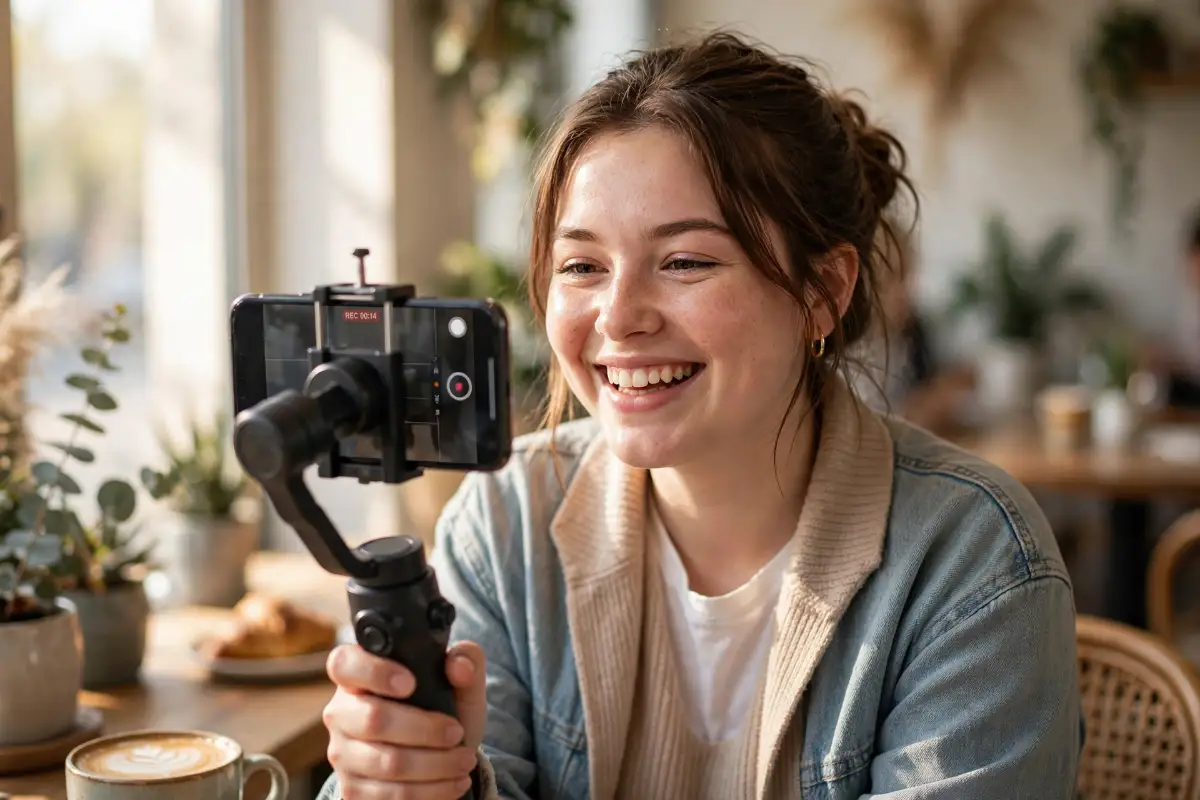
Here is something nobody tells beginners: a great vlogging phone is not the one with the longest spec sheet or the loudest brand name. It is the phone that gets a small handful of things right, the things that decide how your video looks, sounds, and feels. Walk through the checks below in order, and you will be able to judge almost any phone inside a store in about five minutes.
Start With the Main Camera, Not the Sticker Price
Your rear camera does the heavy lifting for travel clips, food shots, product demos, and any scene where the world matters more than your face. For vlogging, the sweet spot on a budget phone is clean 4K video at 30 frames per second, with 1080p at 60 frames as a smooth second option. A bigger image sensor also pulls in more light, which is why two phones with the same megapixel count can look completely different indoors.
The Two Numbers Worth Checking First
- 4K at 30 fps on the main camera for sharp, detailed footage you can crop a little later
- 1080p at 60 fps for smooth walking shots and gentle, dreamy B-roll
- A wide main lens that fits you and the background in one frame at arm's length
- Autofocus that locks onto faces and does not pulse or hunt in indoor light
This is where phones like the Google Pixel A-series earn their fans, because their smart processing squeezes clean, bright video out of modest hardware. Samsung's Galaxy A-series models, such as the Galaxy A35 and Galaxy A55, answer with reliable colors and optical stabilization on some versions. The Nothing Phone (2a) and Xiaomi's Redmi Note line are also worth a look if they are sold in your area through official channels.
Three Reader Favorites, Side by Side
| Phone | 4K Video | Stabilization | Front Camera Video | Mic Setup |
| Google Pixel A-series | 4K at 60 fps | Electronic, with smart software smoothing | 4K at 30 fps | Dual mics with wind noise cleanup |
| Samsung Galaxy A-series | 4K at 30 fps | Optical on many models, plus electronic | 4K at 30 fps on select models | Dual mics with noise reduction |
| Nothing Phone (2a) | 4K at 30 fps | Electronic | 1080p at 60 fps | Dual mics |
Steady Footage Beats Fancy Resolution Every Single Time
Shaky video is the fastest way to make viewers feel tired, even when they cannot explain why. Your eyes and inner ear expect the world to glide smoothly, so every tiny bounce in the frame fights against that natural expectation. That is why a steady 1080p clip almost always feels more professional than a bouncing 4K clip.
Good phones fight shake in two ways, and the difference matters on a budget. Optical stabilization, or OIS, physically floats the lens or sensor to cancel small hand movements, and it shines in low light. Electronic stabilization, or EIS, uses a gyroscope and crops the frame edges to smooth the motion, and it works best in bright daylight — and if you enjoy the tech side, Android's camera documentation explains how this capture and stabilization pipeline works under the hood.
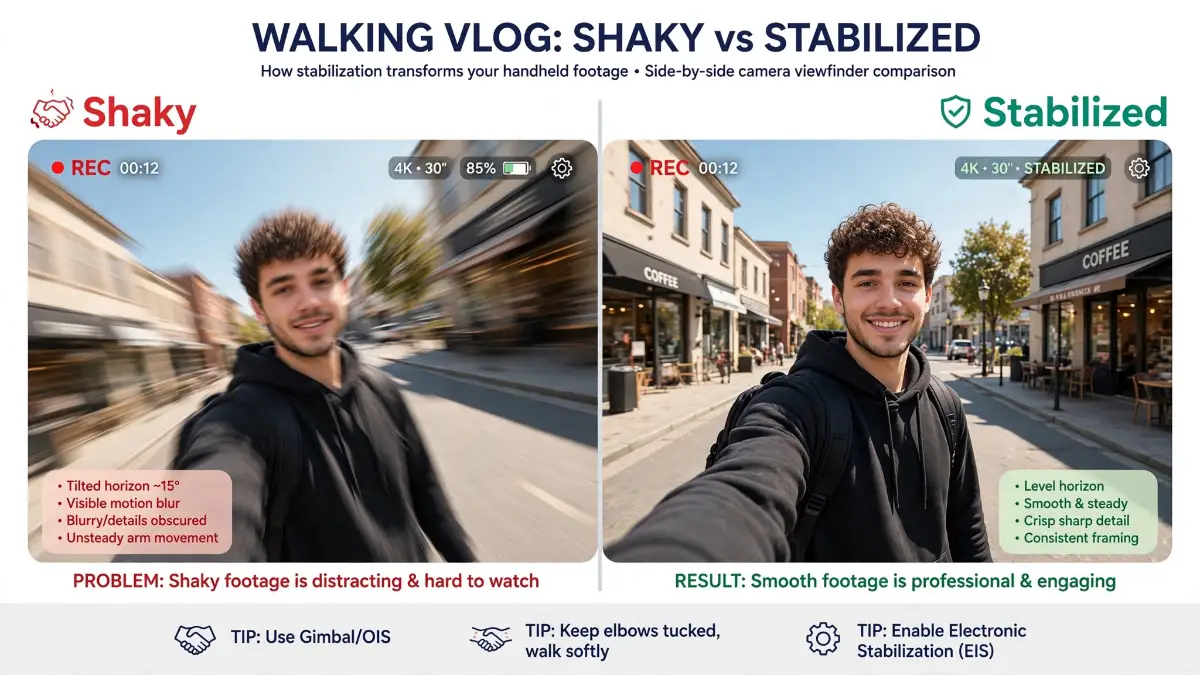 Here is a mistake I made with my own money, so please learn from it instead of repeating it. I once chose a phone purely for its big megapixel number and ignored stabilization, and every walking shot I filmed looked like it was recorded during a mild earthquake. My rule now is simple: stable and slightly softer beats sharp and shaky, every single time.
Words and spec sheets can only take you so far, so watch a real walking test with your own eyes before you trust any camera claim. Then come right back, because the next two checks decide whether people actually finish watching your videos.
Your Front Camera Is the Lens Your Audience Sees Most
Here is a truth that surprises many beginners: your audience spends most of the video looking at the front camera's picture, not the rear one. That little lens films your talking-head clips, your reactions, and your daily check-ins, so it deserves the same respect as the main camera. On a budget phone, clean 1080p front video is the honest minimum, and a few models now offer 4K up front.
- Front video of at least 1080p, with 4K as a happy bonus
- Fixed focus set for arm's length, so your face stays sharp on a selfie stick
- A bright screen that you can actually see under strong sunlight
- A wide enough front lens to fit a friend beside you without cutting off ears
Picture yourself filming at a busy outdoor market at noon, with sunlight bouncing off every stall and awning around you. If the screen is dim, you cannot see whether your face is too dark or the frame is cutting off your head. A bright display turns that stressful guesswork into a calm, two-second glance.
Honest, Clear Audio Will Save Average Video Every Time
Viewers forgive a slightly soft picture far faster than they forgive bad sound, and there is simple brain science behind that. Your audience follows your words to understand the story, so every crackle, echo, and gust of wind forces their brain to work harder. When listening feels like work, people quietly leave, even if your topic was genuinely helpful.
Look for a phone with two microphones and smart noise reduction, because the second mic helps the phone separate your voice from the street around you. Also check the port story before you fall in love with a phone, since most plug-in and wireless mics connect through USB-C. A few budget models still keep a headphone jack, which lets you use cheap wired lapel mics without any adapter.
Here is a tiny test I ran in my own kitchen that changed my mind about cheap gear forever. I read the same two lines into my phone mic, then into a no-name lapel mic clipped to my shirt, and the difference honestly made me laugh — my voice jumped from faraway and tinny to close, warm, and clear. My rule since that day is simple: if money is tight, buy the little mic before you dream of a bigger phone.
- Dual microphones with wind and noise reduction for outdoor talking
- USB-C port that works with plug-in and wireless microphone receivers
- A simple test trick: record a voice memo near a fan, then judge it with earphones
Before you judge any phone, record a thirty-second voice clip beside a running fan and a window facing the street. Play it back with earphones and ask one plain question: could a stranger follow every word without straining? If the honest answer is no, keep looking, because no editing app can fully repair muddy audio later.
Battery and Storage Quietly Decide How Your Shoot Day Ends
Nothing stings quite like a phone dying during the best light of the whole day. A long vlogging session mixes a bright screen, a hardworking camera, and constant uploads, and that cocktail drains small batteries with surprising speed. Big 4K files also eat storage fast, sometimes several hundred megabytes for a single minute of footage.
Imagine a weekend trip where you film a morning market, a boat ride, and a sunset street walk on one charge. A phone in the 5,000 mAh battery class usually survives that day with room to spare, especially when you follow a few easy habits for a longer smartphone battery life. Pair it with at least 128 GB of storage, or a memory card slot where offered, and you stop deleting yesterday's clips at midnight.
- Battery in the 5,000 mAh class for full-day filming without a power bank glued to your hand
- 128 GB storage minimum, with 256 GB or a card slot as the comfort zone
- Fast charging support so a lunch break can rescue a nearly empty phone
A Bright Screen and a Smooth Chip Make Editing Feel Easy
Most budget creators edit on the same phone they film with, so the screen and processor quietly shape your whole workflow. A smooth chip keeps apps like CapCut responsive when you stack clips, captions, and music on one timeline. An OLED screen with strong brightness also shows your colors more honestly, both while framing outdoors and while fixing exposure later.
Three Friendly Myths That Quietly Waste Beginner Money
Myth: You need 8K video to look professional on YouTube.
Reality: Viewers watch on phones, where clean and steady 4K or even 1080p looks sharp, while 8K only devours storage and battery.
Myth: More megapixels always mean better video quality.
Reality: Sensor size, stabilization, and smart processing shape your footage far more than a giant megapixel number printed on the box.
Myth: Only costly flagship phones can grow a real channel.
Reality: Steady shots, clear audio, and decent light beat raw price, and many growing channels started on humble mid-range phones.
A Five-Minute Cheat Sheet You Can Use Inside Any Store
Keep this little table in mind when you compare phones side by side on a shop shelf.
| Camera Feature | Why It Matters for Vlogging | What to Look For |
| Main camera video | Sharp and clean main footage | 4K at 30 fps |
| Stabilization | Smooth walking and travel shots | OIS or strong EIS |
| Front camera | You face it in most clips | 1080p video or better |
| Microphones | Clear voice in noisy places | Dual mics with noise cut |
| Battery | Survives a full shoot day | 5,000 mAh class |
| Storage | Room for large video files | 128 GB plus or card slot |
Where to Check These Phones Without Getting Fooled
Start with the safest doors first: the official Google Store for Pixel phones and Samsung's official store for Galaxy models, both online and in person. Well-known marketplaces and electronics retailers such as Amazon, Best Buy, and Walmart are also common, trusted places where these phones are sold with clear return policies. A local authorized dealer is a fine choice too, as long as the shop gives you a proper receipt and warranty papers.
Wherever you shop, match the exact model name and storage size with the official product page before you pay, because similar names often hide weaker cameras. If a store allows it, hold the phone, open the camera app, and record twenty seconds while walking slowly. That tiny test tells you more about stabilization and screen brightness than an hour of reading brochures.
So here is your simple game plan: camera first, steadiness second, and audio always riding shotgun beside them. Pick the budget phone that treats those three with respect, and your gear stops being the excuse and starts being the quiet partner behind your growth. In the next part of this guide, we will compare the strongest budget models head to head, feature by feature.
Small Settings, Big Secrets: How Pros Squeeze Pro Video From a Budget Phone
You picked the phone with the checks from the first half of this guide — steady camera, honest mics, roomy storage. Good. Now comes the part nobody at the phone shop talks about: the same phone can shoot dull, flat clips or bright, pro-looking videos, depending on the hands holding it.
Light: The Free Upgrade Hiding in Your Room
Here is a secret that took me embarrassingly long to learn: cameras do not see faces, they see light. When light is soft and falls on your face from the front, even a cheap sensor looks rich and clean. When light is harsh or sits behind you, even a costly phone struggles, so your first upgrade is not gear at all — it is a window.
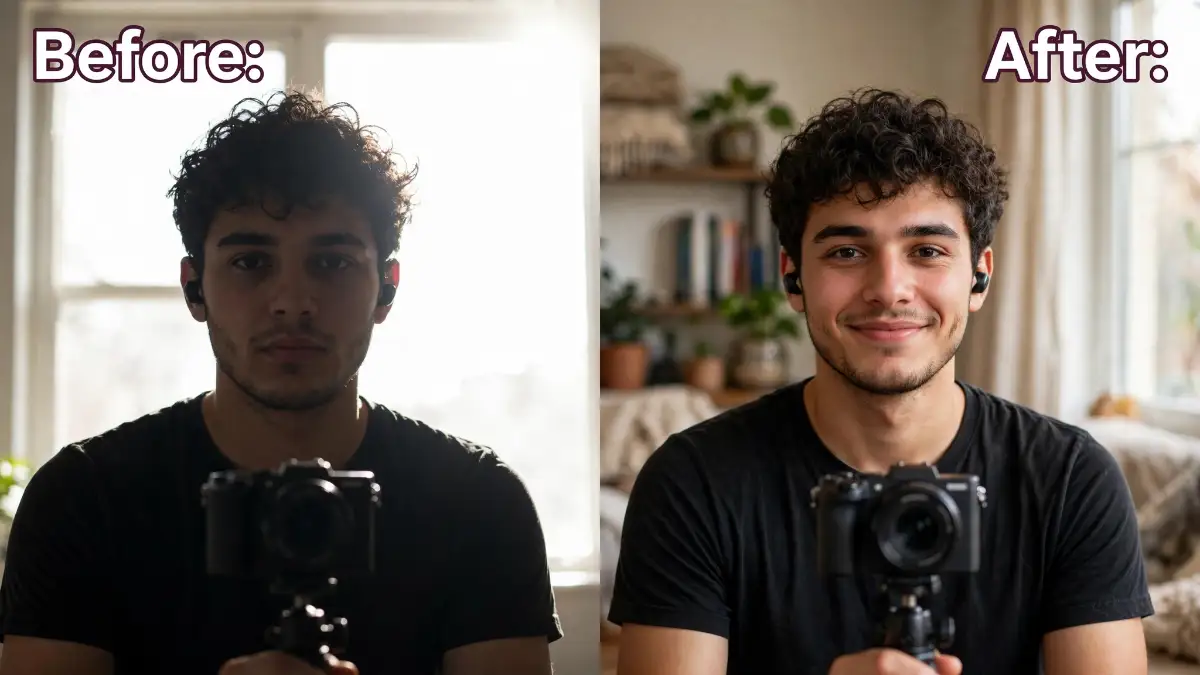
Picture this: you film a cooking clip at noon with sunlight blasting through the window behind the stove. Your face turns into a dark shadow while the wall behind you glows white. Now turn around, face that same window, and suddenly your skin looks smooth, your eyes catch a sparkle, and the food colors pop — same phone, same room, zero money spent.
- Face the light source so the brightness lands on you, not behind you
- Shoot in the morning or late afternoon when sunlight is soft and golden
- Hang a thin white curtain or bedsheet over a harsh window to soften strong sun
- Turn off mixed ceiling lights when filming near daylight, so your skin does not turn orange on one side
Framing Habits That Make Viewers Stay
Good framing is mostly about respect for the viewer's eyes. Put the camera at eye level, because filming from below makes anyone look tired and heavy, and filming from far above makes you look small and unsure. Leave a little space above your head, keep your eyes near the top third of the frame, and your video instantly feels calm and confident.
- Turn on the grid lines in camera settings and place your eyes along the top line
- Tap and hold on your face to lock focus and brightness before you press record
- Step closer instead of pinching to zoom, because digital zoom turns video grainy fast
- Sweep the background for five seconds and remove anything messy, bright, or distracting
Think of framing like setting a dinner table before guests arrive. Nobody praises the table itself, but everyone feels the care. A messy table quietly ruins the meal before the first bite, and a messy frame does the same to a good video.
The Settings Menu: Where Beginners Never Look
Your phone hides its best video tools inside the settings menu, and most owners never open it once. Many phones offer a stronger "active" or "super steady" mode that trades a little sharpness for much smoother walking shots, and Android's camera documentation explains how this capture and stabilization pipeline works under the hood. Pick smoothness for walking vlogs, and the normal mode for still, seated talks.
Pixel owners get extra gifts here, like cinematic blur for soft backgrounds and speech cleanup for windy clips, and Google's guide to Pixel camera features walks through each one in plain steps. Whatever brand you hold, switch on Do Not Disturb before filming so a call never murders your best take, and close heavy apps running behind the scenes — those background apps quietly draining your mobile data also steal memory your camera needs.
- Match your frame rate across clips so edits look smooth, not jumpy
- Turn off beauty filters that melt your skin into plastic on big screens
- Record a five-second test after changing any setting, before the real shoot
Audio Upgrades That Cost Less Than a Pizza
You already know clear sound keeps viewers watching — now let us make it cheap. A basic wired lapel mic clipped near your collar can lift your voice more than a phone twice the price, because distance is the real enemy of clear audio. No mic yet? Record your voice on a second phone kept close to your mouth, then sync the two tracks in your editor with one loud clap at the start.
Wireless mics feel magical, but their sound rides on the Bluetooth link between the mic and your phone, and how Bluetooth codecs handle wireless audio quality decides whether your voice arrives rich or thin. Also, soften your room: curtains, cushions, and a rug swallow echo for free, which is why closet recordings sound oddly professional. Test with earphones, always — phone speakers hide problems your viewers will hear clearly.
A Simple Care Routine That Protects Your Results
Professionals do not treat their phone like a toy they replace when it moans; they treat it like a work tool with a weekly rhythm. Copy that rhythm: back up your best clips every week, keep storage comfortably below full so the camera never chokes, and learn one new camera trick each week instead of ten in one panicked night. Small, steady habits beat heroic fixes, every single time.
Battery care sits inside the same routine, because a tired battery quietly shortens every shoot day. Give your phone quick top-ups before filming instead of baking it on the charger all night, and ignore the scary stories — common fast charging myths make quick charging sound far more dangerous than honest testing shows. Treat the battery kindly, and your vlogging phone keeps serving your channel season after season.

Mistakes That Quietly Steal Your Money, Your Footage, and Your Mood
Let us talk honestly about the traps, because I have stepped into most of them myself. None of these mistakes make you foolish — they make you normal, since phone marketing and rushed shopping push everyone the same wrong way. What matters is seeing the trap before it costs you a phone, a memory, or your whole motivation.
Believing the Biggest Number on the Box
The classic trap: a box screams a giant megapixel count, so the phone must shoot amazing video, right? Wrong — megapixels mostly decide photo size, while video quality lives in the sensor, the stabilization, and the software brain behind them. I have seen modest phones with honest processing humiliate flashy number-monsters in real indoor light.
The damage shows up slowly: you spend your full budget, film for a month, and wonder why your clips still look dull. Before trusting any box, compare detailed camera test scores from independent labs. Even better, watch raw sample videos shot by normal owners in normal rooms like yours.
Treating Sound Like an Afterthought
This one hurts the most, because it steals moments you can never film again. A birthday song, your grandfather laughing at a family lunch, your first street interview — when the audio is wind and mush, the memory is gone, not just the video. Viewers forgive a soft picture in seconds; unclear sound makes them leave, and it makes you delete clips you wish you could save.
Protect yourself with one boring habit: after every important recording, play ten seconds back with earphones before you celebrate. That tiny check has saved more creators than any expensive microphone ever will. Your future self will thank you for it more than once.
Buying From the Friendliest Stranger
A smiling seller, a price far below every shop, no receipt, no box, and a promise that "warranty is my word" — this deal smells sweet and rots fast. Phones sold this way may be refurbished, region-locked, or worse, and when the camera or battery fails in a month, that friendly stranger has vanished. Your savings turn into a full second purchase.
Buy boring instead: sealed box, printed receipt, warranty card, and a shop that will still exist next month. Boring paperwork is the cheapest insurance a creator can own. A real shop also lets you return a faulty unit without begging anyone.
Skipping the Two-Minute Test Before a Big Day
Q: My phone has stabilization, so why did my travel vlog still come out shaky?
A: Because a feature on paper is not a promise in your hands — the wrong mode, a loose grip, and low light can beat any stabilization system. Software fixes in editing apps crop your frame and soften the picture, so "fix it later" quietly taxes every single clip. Test the phone on a real walk before any trip or event that truly matters.
Letting Storage Fill Until the Phone Says No
Here is a heartbreak I hear again and again: the phone hits full storage right in the middle of the best moment of the day, and recording simply stops. Worse, some creators then delete old clips in a panic and lose family footage that mattered more than the vlog. A nearly full phone also slows down, heats up, and makes the camera app stutter at the worst times.
Keep a safety habit instead: leave a healthy chunk of space free, and move finished videos to a card or computer every week. If disaster already happened, learn how to recover deleted photos from an SD card the safe way before you touch anything else. Panic deletes more memories than broken phones ever do.
For vloggers, that same storage habit matters even more, because large video files fill a phone fast, so clear space without deleting the photos and clips you want to keep, and see how to free up storage on your phone without deleting your photos.
Filming on Full Auto Forever
Auto mode is a fine teacher for your first week and a lazy boss after that. Left alone, the camera keeps changing brightness mid-sentence, hunting for focus when you move, and painting faces orange under home lights. Your clips look restless even when your hands are perfectly still, and viewers feel that restlessness without knowing why.
The fix costs nothing: lock focus and brightness with a tap-and-hold, and let auto help only with the small things. Two seconds of control before recording beats twenty minutes of regret in the editor. Your videos will suddenly look calmer, even with the exact same phone.
Cooking Your Battery With Daily Habits
Heat is the silent killer here — filming under hard sun, charging under a pillow, gaming while plugged in, and draining the battery to zero every night. Month by month the battery weakens and starts dying in the middle of shoots, right when you need it most. These are exactly the small daily habits that decide how long your battery survives, and most owners break them without ever knowing.
A phone is a tool you depend on daily, so treat its battery like a teammate, not a punching bag. Your future self, filming a perfect sunset at the end of a long day out, says thank you. Small kindnesses to your battery today become full shoot days tomorrow.
Your First Great Video Is Closer Than You Think
Step back and look at the whole picture now. You know how to judge a budget phone by its camera, steadiness, sound, battery, and storage — and now you also hold the lighting, framing, settings, and care habits that turn that phone into a real creator tool. None of this needs luck or a rich sponsor; it needs a decent phone, honest habits, and the courage to post before everything feels perfect.
Here is the part I love most about budget vlogging: the limits push you to grow the skills that actually build channels. Creators with costly gear still lose to clear sound, steady shots, warm light, and a friendly face that shows up every week. Your small phone, used wisely, checks every one of those boxes.
Your Action Plan for Tomorrow
Tomorrow morning, do not plan a masterpiece — plan one honest practice run:
- Charge up and clean the lens before you touch a single setting
- Stand facing your brightest window and lock focus on your face
- Record sixty seconds about anything you love, with Do Not Disturb on
- Watch it with earphones and note one thing to fix, not ten
- Post it or save it proudly — both count as a real start
A word from my own messy experience: my channel did not grow the day I bought better gear; it grew the week I stopped hiding my "not ready" videos and started posting steady, clear, honest ones. Viewers subscribe to a person learning in public, not to a perfect robot. That person, with that phone already in your pocket, can be you — starting today, not someday.
I believe in your story, because mine began with a shaky kitchen video and a phone I almost threw away. My only wish is that you press record today, forgive the flaws, and let the world meet the creator you already are. I will be cheering for your very first upload like it is my own.
Questions New Vloggers Ask Me All the Time
Can a budget smartphone really shoot video good enough for YouTube?
Yes — clean 1080p or 4K footage with steady framing and clear sound looks great on the phones most viewers watch on. Your topics, your light, and your consistency matter far more than a flagship badge. Many steady, growing channels began with exactly this kind of phone.
Should I record my vlogs in 4K or 1080p?
Pick 4K when you want room to crop or reframe later and your storage can handle the big files. Pick 1080p for longer filming days, smoother editing, and smaller uploads. Either choice looks professional when the shot is steady and the light is kind.
Do I need a gimbal if my phone already has stabilization?
Not at the start — built-in stabilization plus a slow, careful walking style covers most everyday vlogs. Add a gimbal later only if you film lots of walking, travel, or fast-moving scenes. Your money works harder on a small microphone first.
Is the front camera or the rear camera more important for vlogging?
For talking-to-camera vlogs, the front camera carries your face and your connection with viewers, so it matters most day to day. The rear camera wins for travel scenes, food, and product shots. A balanced budget phone gives both sides honest attention.
How do I stop my vlog audio from sounding echoey indoors?
Move closer to the phone or microphone, because distance feeds echo more than anything else. Soft things help too — curtains, cushions, clothes, and rugs calm a bouncy room fast. And always check ten seconds with earphones before filming the full take.
Disclaimer: This article is shared for general information and learning only, and it is not professional buying advice for your personal budget or needs. Phone prices, availability, models, and specifications change often, so please confirm the latest details on the official brand store page before making any decision. This post contains no affiliate links and no sponsored content; every suggestion comes from honest, hands-on creator experience.