
The Silent Struggle Behind My "Perfect" Office Setup
You just dropped a huge chunk of cash on a fancy office chair, expecting your back pain to disappear forever. I did the exact same thing, only to find myself rubbing my stiff neck by 3 PM every single day. Let me share what I actually discovered about why your so-called perfect seat might be ruining your posture, and exactly how you can fix it right now.
But a few weeks later, I noticed something strange happening to my body. My neck started feeling stiff every afternoon around three o'clock. My lower back had this dull ache that wouldn't go away, even after I finished work.
I kept telling myself it couldn't be the chair because it was "ergonomic." I felt like I was doing everything right, yet my body was screaming at me. It was frustrating to spend so much money and still feel like my spine was a twisted pretzel.
I realized that just because a chair is labeled as ergonomic doesn't mean it fits my specific body. My expensive seat was actually pushing my hips into a weird angle. This was my first wake-up call that something was very wrong.
This physical pain eventually starts to drain your mental energy too. It is hard to stay creative or happy when your body feels like it is breaking. You might find yourself snapping at family members because your back hurts so much by dinner time.

Quick Summary & Key Takeaways
- Expensive does not always mean ergonomic; your office chair actually has to fit your unique body shape.
- Keep your feet flat and your screen right at eye level to stop immediate neck and hip strain.
- Active sitting is the real secret. Shift your posture slightly every single hour instead of sitting completely still like a statue.
- Always do the two-finger rule test between your knees and the edge of your seat to keep your blood flowing smoothly.
Why Your Body Feels "Off" Even in a Fancy Chair
We often think that comfort means health, but that is a big mistake. A chair can feel soft and cozy while slowly pulling your bones out of their natural place. This is what experts call the "comfort trap" of modern office furniture
Myth vs. Fact: The Comfort Trap
- The Myth: If a chair feels like a soft cloud when you first sit down, it is doing a great job protecting your back.
- The Fact: Ultra-soft seats actually cause your pelvic bones to sink unevenly. You really want a firm base that keeps your hips completely level, even if it feels a little stiff at first..
One major sign to look for is how your feet rest on the floor. If you find yourself constantly crossing your legs, your chair is likely too high or too low. This habit puts massive pressure on one side of your pelvis and twists your spine.
Another red flag is the "forward head poke" where your chin moves closer to the monitor. This happens when your chair doesn't support the natural curve of your middle back. Your neck then has to work ten times harder to hold up your heavy head.
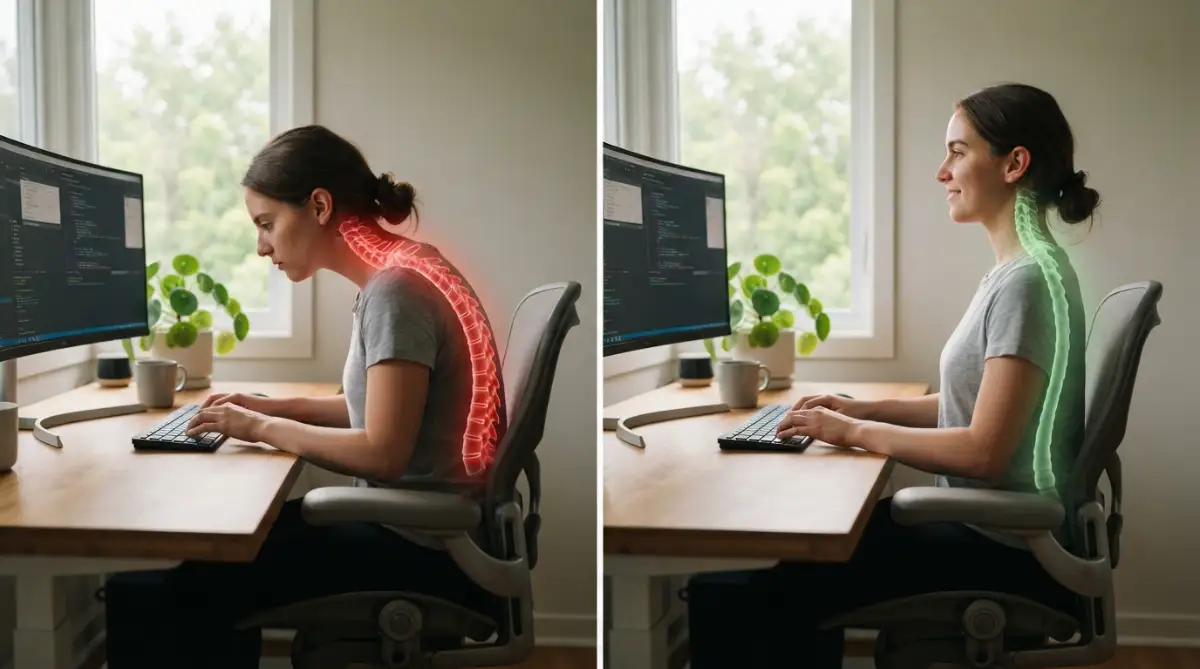
I used to cross my ankles under my chair every ten minutes without thinking. I thought it was just a cozy habit, but it was actually a sign my seat was too deep. My legs were searching for stability that the chair wasn't providing.
If you feel a "pins and needles" sensation in your thighs, pay close attention. This is a sign that the edge of the seat is cutting off blood flow or pressing on nerves. Your chair might be deep enough for a giant, but too long for your legs.
The Hidden Warning of Shallow Breathing
Did you know your chair can change how you breathe? If the backrest is too curved, it can collapse your chest inward. This makes it impossible to take deep, healthy breaths while you work.
When you breathe shallowly, your body stays in a state of "fight or flight" stress. You might feel anxious or tired for no reason at all. It is amazing how much a simple chair adjustment can change your entire mood.
Check out this helpful visual guide on how to align your chair perfectly for your height.
My 3-Second Posture Check Checklist:
- Are my feet resting totally flat on the floor? (If not, grab a thick book or a small footrest).
- Is my monitor right at eye level? (Your chin should never point down while reading).
- Can I fit two fingers between the edge of my chair and the back of my knees? (If no, you need to adjust the seat depth immediately).
Watch this video to see the exact angles your body needs to stay pain-free all day long.
How to Check Your Spinal Alignment Right Now
You don't need a doctor to see if your chair is failing you. You can do a simple "wall test" or "mirror check" during your next break. Stand up and see if your shoulders feel like they are rolling forward naturally.
If they are, your chair is likely encouraging a "slouch" position. A good ergonomic chair should help your chest stay open and your ears stay over your shoulders. If you have to fight the chair to sit straight, the chair is the problem.
Another trick is the "two-finger" rule for the back of your knees. Sit all the way back until your bottom touches the backrest. There should be a gap about the width of two or three fingers between the seat and your knees.
If the seat is touching the back of your knees, it will pull your lower back away from the support. This creates a "C" shape in your spine instead of an "S" shape. Over time, this leads to bulging discs and permanent posture changes.
Finding the Sweet Spot for Your Lower Back
The lumbar support should hit you right in the small of your back. Many people have this support set too low, which actually pushes the tailbone forward. This flattens the natural curve of your spine and causes instant fatigue.
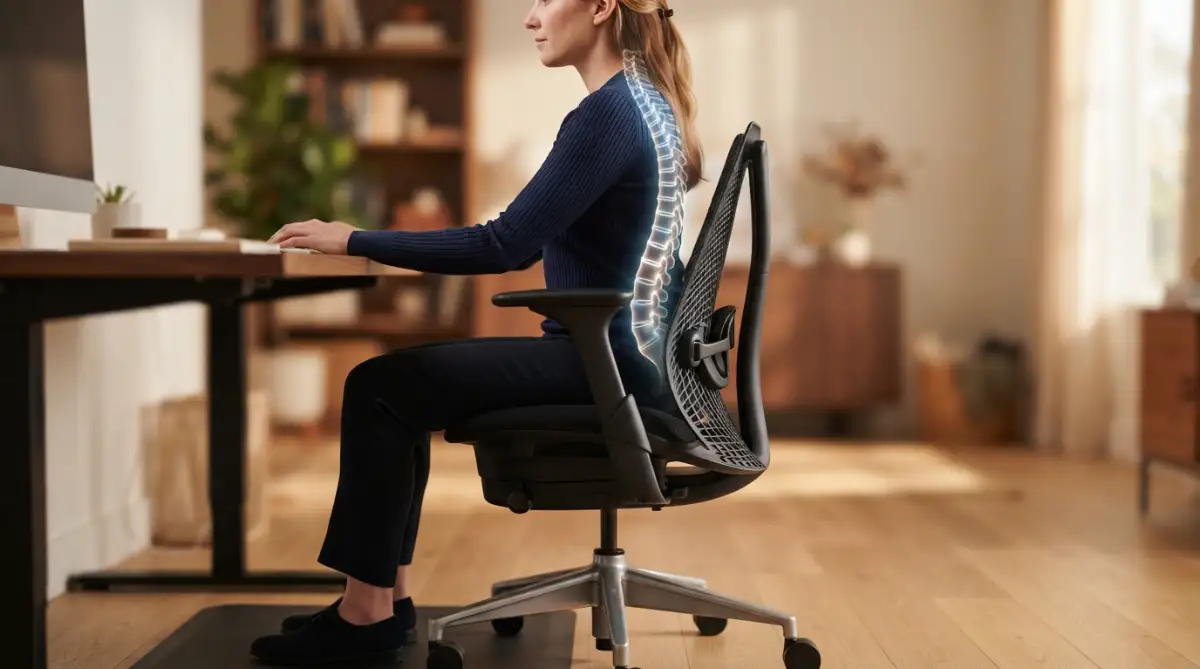
Try moving the support up or down until it feels like a gentle hand pressing against your spine. It shouldn't feel like a hard lump or a deep hole. It should feel like a natural extension of your own body.
Pro Tip: I once used a rolled-up towel as a temporary back support to test different heights. It helped me realize my expensive chair's built-in support was actually three inches too low for my torso. Don't be afraid to add your own small cushions to make a chair truly fit your unique shape.
The Problem with Armrests You Never Noticed
Armrests are often the most ignored part of an office chair. If they are too high, they push your shoulders up toward your ears. This causes those "tension headaches" that many office workers suffer from every afternoon.
If they are too low, you will lean to one side to reach them. Leaning to one side for hours tilts your spine and can lead to scoliosis-like symptoms. Your arms should rest at a ninety-degree angle without any effort.
If your armrests are non-adjustable, you might be better off removing them entirely. It is better to have no armrests than to have ones that force your body into an awkward shape. Your spine will thank you for the extra freedom.
The Science of Why Sitting Feels So Hard
Our bodies were never designed to sit still for eight to ten hours a day. Gravity is constantly pulling on us, and a chair's job is to distribute that weight. When a chair is poorly designed, that weight falls entirely on your lower vertebrae.
The discs between your bones are like small sponges filled with fluid. When you sit in a misaligned chair, you "squeeze" one side of those sponges constantly. Eventually, the fluid can leak out or the disc can wear down much faster than normal.
This is why movement is just as important as the chair itself. Even the best chair in the world will cause issues if you never stand up. A great chair just buys you more time before the fatigue sets in.
Why Your Hips Hold the Key to Everything
Your pelvis is the foundation of your entire spine. If your chair seat tilts too far back, it tucks your tailbone under. This is a disaster for your spinal alignment because it reverses the natural curve of your lower back.
On the flip side, a seat that tilts too far forward can make you slide out. This forces your core muscles to work too hard just to stay in the seat. You end up exhausted before you even finish your first cup of coffee.
Look for a chair that allows for a "neutral" pelvic tilt. This means your hip bones are level and your spine feels "tall" without straining. It should feel like your spine is floating easily above your hips.
Small Changes That Make a Big Difference
Sometimes you don't need a new chair to fix your alignment. You might just need to adjust the tension of the reclining feature. If it is too loose, you will always be slouching back without support.
If it is too tight, you will be sitting too stiffly, which tires out your muscles. You want a chair that moves with you but still supports your weight. Think of it like a partner rather than a rigid piece of wood.
Try adjusting your monitor height along with your chair. If your screen is too low, you will look down regardless of how good your chair is. Your eyes should be level with the top third of your computer screen.
I spent years thinking my back was the problem when it was actually my monitor height. Once I raised my screen, my chair finally felt like it was working correctly. Everything in your office setup works together like a team.
Don't ignore the "hidden signs" your body is giving you today. If you feel stiff, tired, or numb, your chair is sending you a message. Listening to those small aches now can save you years of chronic pain later on.
Your spine is the highway of your nervous system. Keeping it aligned isn't just about comfort; it is about your total health. Take five minutes today to check your angles and listen to what your back is telling you.
Mastering the Art of Pain-Free Sitting
After spending years trying to figure out why my "best" chair was making me miserable, I found that small hacks change everything. It is not just about having a good chair; it is about knowing how to make that chair work for your specific skeleton. Most people just sit down and hope for the best, but that is a recipe for a lifetime of stiff necks and lower back issues.
One of the best tricks I ever learned was the "Active Sitting" method. Instead of staying locked in one position for hours, I started making tiny changes to my chair’s tilt every sixty minutes. Even a one-degree shift in your backrest angle can move the pressure from one part of your spine to another. This prevents any single muscle group from getting overworked or "stuck" in a bad habit.
I also realized that my feet were the secret anchors for my entire posture. If your feet are just dangling or tucked under your seat, your lower back has to do all the heavy lifting. I started using a small footrest to keep my knees slightly higher than my hips. This simple change instantly took the pressure off my tailbone and helped me avoid that feeling of waking up tired every day because my body was finally resting properly.
The Hidden Power of Dynamic Reclining
Most people think they should sit at a perfect ninety-degree angle, like a robot. But research from experts at the Cleveland Clinic shows that a slight recline of about 100 to 110 degrees is actually better for your spinal discs. This angle helps the chair take more of your body weight so your spine doesn't have to compress as much.
I started setting my chair’s tension so I could lean back slightly without feeling like I was falling. This allows my core muscles to stay engaged but relaxed at the same time. If you feel like your mental health is suffering from digital overload, it might actually be physical stress from sitting too rigidly. Your brain and body are connected, and a stiff spine often leads to a stiff, stressed-out mind.
Why Your Chair Needs a "Breathable" Plan
I used to ignore the material of my chair, thinking it was just about looks. But I found that a chair that traps heat makes you squirm and shift into bad positions just to get cool. When you get hot, you tend to lean forward away from the backrest, which ruins your alignment immediately.
Choosing a mesh back or high-quality breathable fabric keeps your body temperature stable. When you are comfortable, you are less likely to fidget and lose your "sweet spot" of alignment. I found that managing my blood pressure habits was much easier when I wasn't constantly stressed by a hot, uncomfortable office environment.
The Secret of Peripheral Alignment
Your chair doesn't live in a vacuum; it lives in your office. I noticed that if I reached for my mouse too often, my right shoulder would slowly pull forward. This twisted my middle spine and caused a sharp pain under my shoulder blade. I moved my mouse closer to my body and lowered my armrests so they were level with my desk.
This allowed my shoulders to drop naturally away from my ears. If you find yourself hunched over while checking your phone hardware, you are doubling the damage to your neck. Keeping everything within a "neutral zone" ensures that your chair can actually do its job of keeping you straight.
The Role of Pelvic Stability
The most advanced tip I can give you is to check your "Sit Bones." You should feel the two hard bones in your bottom pressing evenly into the seat. If you feel more weight on one side, your spine is already curving like a banana. I spent months leaning to the left to reach a drawer, and my spine actually started to adapt to that tilt.
Now, I make sure my weight is perfectly centered before I start typing. It sounds small, but over thousands of hours of work, this balance is what keeps your discs healthy. It is part of building sustainable work habits for creators who want to stay in the game for a long time.

Traps and Blunders That Can Ruin Your Spine
I see so many people making the same mistakes I did, and it honestly hurts to watch. The biggest trap is thinking that an expensive chair means you don't have to worry about posture. I've seen people buy a thousand-dollar chair and then sit in it like they are lounging on a sofa. A chair is a tool, not a magic cure; you still have to use it correctly.
Another major blunder is "over-propping." Some people get so worried about their back that they add three extra cushions and a lumbar roll. This actually pushes your spine into an unnatural "S" curve that is too deep. This creates new pressure points that weren't there before and can lead to muscle spasms.
I once thought that using incognito mode for flights was the only way to save money, only to find out there were much better ways. Posture is the same; people follow "common sense" myths that actually make things worse. For example, sitting "bolt upright" is not natural and can cause more fatigue than a slight slouch.
The Danger of the "Soft Seat" Myth
We all love a soft, pillowy chair, but that softness is often your enemy. A seat that is too soft doesn't support your pelvic bones, causing them to sink and tilt. This tilt pulls your lower back out of alignment and puts massive pressure on your tailbone. I realized that a firmer seat actually felt better at the end of the day because my bones weren't struggling for stability.
If you are a student or a remote worker, avoid the temptation to work from your bed or a soft recliner. It might feel good for ten minutes, but your memory and focus will suffer as your body gets tired from the lack of support. Your brain needs oxygen, and you can't breathe well when you are slumped into a soft surface.
Ignoring the Signs of "Tech Neck"
Your chair might be perfect, but if you are constantly looking down at a laptop, your spine is still in danger. I see people with great chairs who still have a "hunch" because their screen is too low. They blame the chair for their neck pain when the chair was never the problem.
This is like blaming your shoes for your wet feet when you forgot to wear an umbrella. You must look at your desk, your monitor, and your chair as one single system. If you ignore one part, the others cannot save you from pain.
Falling for the "No Break" Hero Mentality
I used to be proud of sitting for four hours straight without moving. I thought I was being productive and focused. In reality, I was just starving my spinal discs of the movement they need to stay hydrated. Spinal discs don't have their own blood supply; they get nutrients through movement.
If you stay still too long, your spine literally starts to "dry out" and become brittle. No chair can prevent this; only you can. It is just as important as protecting your smartphone battery; you have to manage your body's energy and health with regular maintenance.
Taking Charge of Your Daily Comfort
The journey to a healthy back is not a sprint; it is a long-term commitment to listening to your body. I spent so much time ignoring the small aches and pains, thinking they were just part of getting older. Once I realized that these were warning signs from my chair, my whole life changed. I have more energy, I sleep better, and I don't dread sitting down to work anymore.
You have the power to fix your setup today without spending a fortune on new gear. Start with the small things: adjust your height, check your feet, and move your monitor. These tiny shifts add up to a huge difference in how your body feels after a long day of work.
I want you to know that you don't have to live with that nagging back pain or that stiff neck. My back used to feel like a heavy weight was pulling me down, but now I feel light and flexible even after a full day at my desk. Please take a moment right now to adjust your chair and give your spine the support it truly deserves.
Frequently Asked Questions About Office Chairs and Spine Health
How do I know if my chair is at the right height?
Your feet should be flat on the floor with your knees at a ninety-degree angle. If your knees are higher than your hips, the chair is too low; if your feet are dangling, the chair is too high. You can also check if your elbows are level with your desk surface while typing.
Can a bad office chair cause headaches?
Yes, absolutely. If your chair doesn't support your upper back, your neck muscles have to strain to hold your head up. This tension travels up the back of your head and often results in dull, throbbing tension headaches by the end of the day.
How often should I replace my ergonomic chair?
Most high-quality chairs last between seven to ten years. However, if you see the foam flattening out or the backrest becoming loose, it is time for a change. A chair that has lost its shape can no longer provide the support your spine needs to stay aligned.
Is a standing desk better than an ergonomic chair?
Neither is "better" on its own; the best approach is to use both. Standing all day can be just as hard on your joints as sitting all day. The secret is to switch between sitting and standing every thirty to sixty minutes to keep your muscles active and your blood flowing.
Why does my back hurt more after I bought a new ergonomic chair?
Your body might be used to a "bad" posture, so sitting correctly feels strange at first. This is often called "postural retraining." However, if the pain lasts more than two weeks, the chair might not be the right fit for your specific body type or height.
Disclaimer: The information provided in this article is for educational purposes only and should not be replaced by professional medical advice. Always consult with a doctor or a qualified physical therapist if you are experiencing chronic or severe back pain.