The Silent Nightmare of Trapped Data Across Daily Workflows
Copying names and order amounts between browser tabs for four hours every week is not real work—it is digital babysitting. I spent months doing this repetitive grind because I honestly believed connecting software required an engineering degree. It does not. By understanding two simple concepts—APIs and Webhooks—you can build reliable, hands-free connections between your favorite tools in less than an hour, even if you have never written a single line of technical script in your life.
Every week, I spent four painful hours copying and pasting customer names, emails, and order amounts from one screen to another. One small typo meant a customer never received their invoice, or a high-ticket client sat waiting for an onboarding email that never went out.
I felt like an overpaid digital courier running between locked rooms. Whenever I asked our technical team for help, they politely placed my request at the bottom of a six-month backlog.
They spoke a different language filled with mysterious acronyms, server protocols, and complex authentication flows. I walked away from those meetings feeling small, frustrated, and completely stuck with my daily manual copy-paste grind.
Many professionals face this exact wall every single working day. You invest in great online tools to make your work smoother, but each tool acts like a deserted island that refuses to talk to its neighbors.
Your lead forms collect contact info, but your customer database never notices. Your payment gateway charges a buyer, but your course platform never unlocks the lessons.
This disconnect steals your mental calm and creates constant anxiety about missed orders and forgotten messages. You end up baby-sitting computers instead of doing the creative, impactful work that actually grows your projects.
You see simple tasks slip through the cracks, and you dread the endless spreadsheets that pile up every afternoon. The human brain was never built to serve as a manual bridge between two digital databases.
Quick Takeaways: What You Need to Know
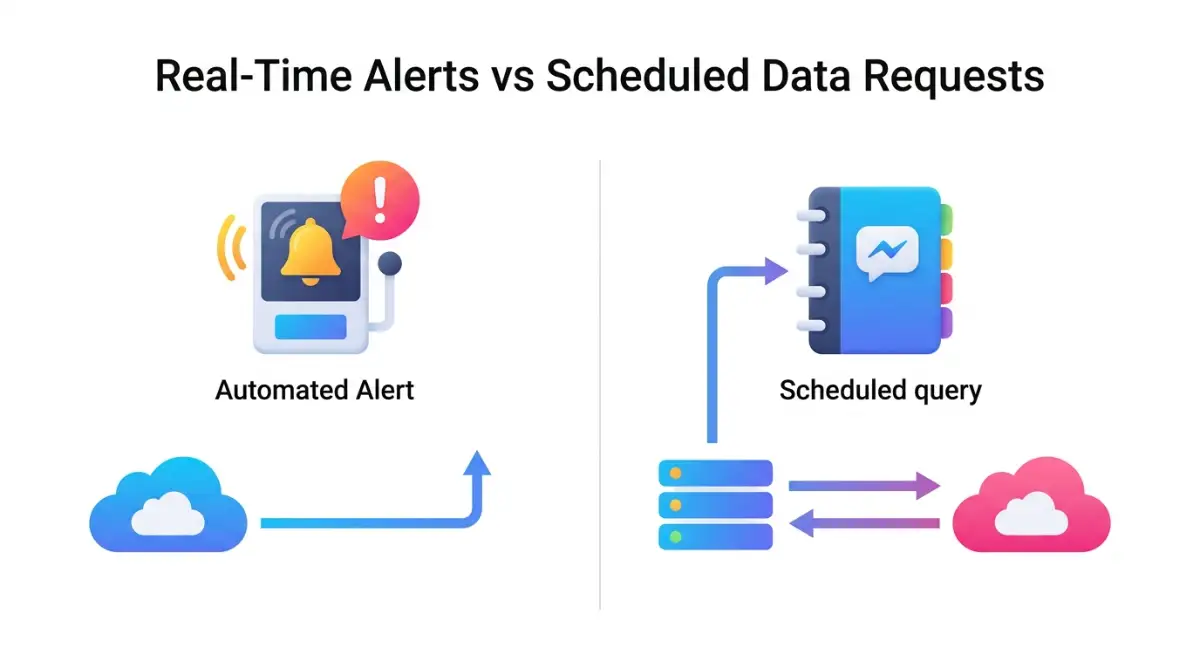
- APIs pull information on a schedule (like asking someone for updates), while Webhooks push alerts the second an event happens (like a doorbell ringing).
- You never need code to link your apps; visual workflow builders let you map incoming fields like Name and Email with simple point-and-click matching.
- Always build one-way connections or insert conditional filters to avoid circular data loops that drain your monthly account allowances.
- Test every newly built connection with realistic placeholder data (like "Jane Smith") before turning it live on real customer accounts.
Breaking Down the Language of Cloud Software Without Any Jargon
To break free from this cycle, you must understand the basic way cloud applications speak to each other. Once you understand the simple logic, the fear of setting up connections disappears completely.
Think of any cloud tool as an office building full of organized filing cabinets. When two different tools want to share a file, they use one of two main methods: they either ask for it directly, or they set up a quick automated alert.
These two communication styles are what the tech world calls APIs and Webhooks. They sound intimidating, but their everyday functions mirror real human conversations.
What is an API? The Digital Messenger
An API stands for Application Programming Interface, but you do not need to memorize that dry phrase. Instead, imagine walking into a pleasant sit-down diner.
You sit at a booth, look at the printed menu, and decide what meal you want to order. You cannot walk directly into the private kitchen to cook the food yourself because the kitchen has safety rules.
Instead, a polite waiter takes your request back to the kitchen staff. The kitchen prepares your plate, and the waiter brings your warm meal right back to your table.
In this scenario, the kitchen is a software database, your table is your current dashboard, and the waiter is the API. The API simply takes your specific request, carries it across the internet, and brings back the exact data you ordered.
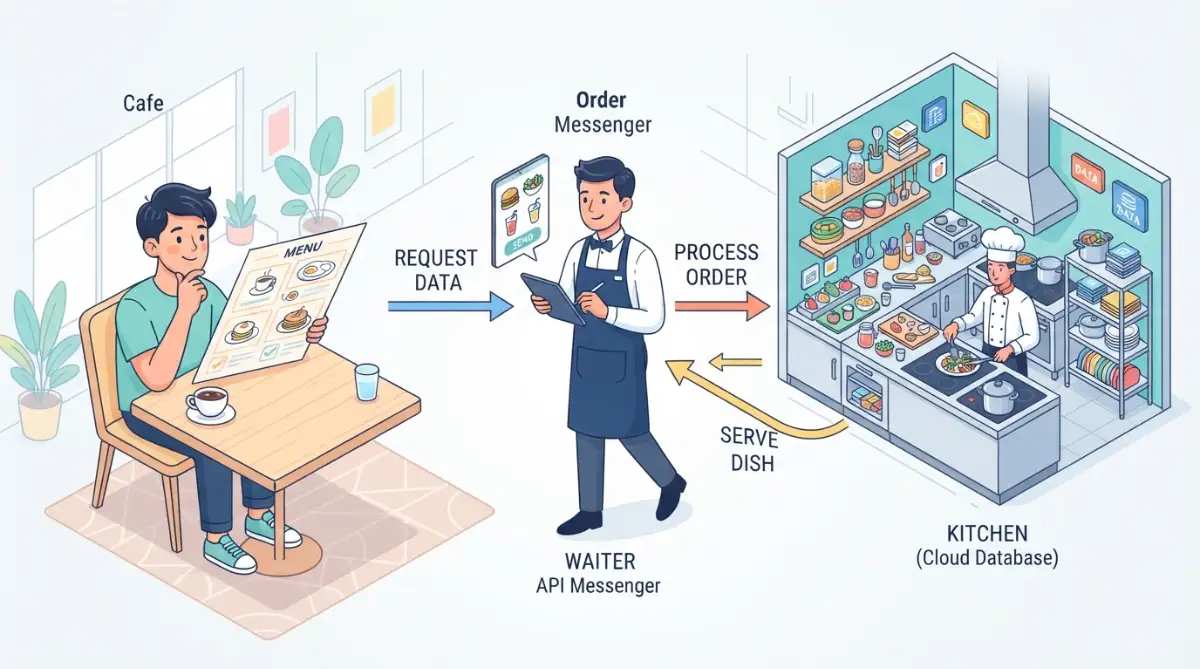
If your dashboard wants to know how many sales occurred yesterday, it sends an API request. The remote app checks its records and delivers the total right back to your screen.
What is a Webhook? The Instant Doorbell
Now imagine waiting by your front door for an important package to arrive. You could open the door every sixty seconds to check the porch, but that would waste your entire afternoon and drain your energy.
Opening the door repeatedly to check for news is what computers call polling, which relies on standard API requests. It works, but it takes constant effort and keeps both systems needlessly busy.
A Webhook solves this problem by functioning like a modern front doorbell. You do not stand by the door; you relax on your sofa and read a book in peace.
When the delivery driver drops off the package, they press the doorbell button once. That single chime instantly alerts you that something new happened on the porch right at that exact second.
A webhook is an automated notification pushed from one tool to another whenever a specific event occurs. It does not ask for information repeatedly; it fires a message only when something happens.
Comparing APIs and Webhooks Side by Side
To make this crystal clear, review this simple comparison to see when each method works best:
The Plain-English Framework for Joining Your Apps
Connecting two platforms does not require writing complex programs. Visual workflow platforms have turned this once-difficult task into a series of simple digital puzzle pieces.
To connect any two isolated apps on your own, you only need to follow three clear, logical stages. Each stage answers a basic question about what information needs to move and where it should land.
Mapping Your Origin and Destination
Every automated bridge begins with a clear source and a clear target. You must decide which app witnesses the first event and which app needs to react to it.
Start by writing down the exact moment that starts the entire chain reaction. We call this moment the Trigger.
For example, your trigger might be a customer filling out an inquiry form on your website. That event happens inside your form builder app, making it the origin point of your workflow.
Next, pick the destination app that must receive that customer's information. It might be your primary contact book, a team chat channel, or a clean spreadsheet row.
By writing down the trigger app and the action app on paper first, you eliminate all confusion before touching any digital settings. You now have a clear path that guides every decision.
Want to see a real-time data flow in action before setting up your own bridge? Watch this clear visual breakdown below to master the basics in minutes.
Catching the Event Data with a Webhook Receiver
Once you know your starting point, you must provide your origin app with an address to send its news. This address looks just like a standard website link, but it functions as a digital mailbox.
When you use modern no-code connection platforms, the platform gives you this special link with a single click. You simply copy that provided link and paste it into the webhook settings of your origin app.
Now, whenever a visitor completes your form, the form app instantly bundles up that information. It ships that digital envelope directly to the address you just provided.
The bundle contains ordinary information such as the person's first name, their email address, and their project budget. No code is required to read this; your visual tool organizes these details into neat labels that anyone can understand.
Guiding Your Data into the Destination Fields
Now comes the most satisfying part of the entire process. Your visual automation platform displays the sample data that just arrived through your webhook link.
You open the settings for your destination app right inside the visual builder. The builder presents you with empty boxes matching your destination app, such as First Name, Email, and Phone Number.
You simply click on each empty box and pick the matching label from your incoming webhook bundle. You put the incoming Name label into the Name field, and the incoming Email label into the Email field.
This simple matching process is called field mapping. It is no different than writing someone's postal address on the front of an envelope.
Once your fields match up, you turn on your workflow switch. From that second forward, the two isolated apps communicate instantly every time a new event takes place.
Pro Tip: When I first attempted this setup, I made the mistake of testing with imaginary words like "test test" in my form fields. I got completely confused later when matching the labels, so I started using clear, realistic names like "Jane Smith" and "jane@example.com" on test submissions to make field mapping effortless.
Common Myths That Keep Teams Stuck in Manual Drudgery
Even with visual platforms available everywhere, many smart professionals hesitate to connect their tools. Deep-seated misconceptions convince them that software bridges are dangerous or fragile.
Breaking through these myths helps you claim complete ownership of your daily digital workspace. Let us clear up the three biggest worries that hold people back.
Myth 1: You Must Know How to Write Software Code
The biggest lie in the business world is that data movement belongs only to software engineers. While engineers build the underlying roads, you do not need to be a mechanical engineer just to drive a car down the street.
Modern visual tools convert technical protocols into clean buttons, simple dropdown lists, and clear checkboxes. If you know how to send an email attachment, you already possess the computer skills needed to connect two apps.
You never have to inspect complicated script files or stare at a black terminal screen. You only match labels from column A to boxes in column B.
Myth 2: Webhooks Are Fragile and Break Without Warning
People often worry that automated connections will randomly fail and drop important business records into an internet black hole. In reality, modern cloud bridges are built with strict safety nets.
If your receiving app happens to be down for maintenance, well-designed automation platforms do not toss your data away. They hold the incoming webhook message in a safe waiting line and try delivering it again automatically.
You can also view a clean activity log whenever you wish. The log shows the exact date, minute, and outcome of every single exchange, providing absolute visibility over your operations.
Myth 3: Custom Integrations Always Cost Huge Money
Many business owners assume they need thousands of dollars in enterprise software licenses to make their tools talk. This belief causes them to keep paying human staff to do repetitive data entry.
The truth is that almost every popular SaaS tool includes built-in webhook and API access on their standard plans. Furthermore, popular connection platforms offer generous free plans that handle hundreds of tasks every month at zero cost.
You do not need expensive consulting retainers to achieve a clean, smooth operation. You can assemble your entire operational bridge using tools you already pay for every month.
Here is how the top visual connection platforms stack up for real-world projects, based on what you actually get without spending a dime:
Platform | Free Monthly Operations | Instant Webhook Support? | Best Practical Fit
Zapier | 100 tasks | Available on starter setups | Simple, one-step alerts to email or chat
Make (Integromat) | 1,000 operations | Included free with zero delays | Multi-step routes on a lean budget
n8n (Desktop/Self-Hosted) | Unlimited runs | Completely open | Handling massive daily spreadsheets privately
Pick one platform and stick to it for your first three automations. Jumping between tools early on only adds unnecessary confusion.
Practical Everyday Workflows You Can Connect in Minutes
To help you see the possibilities in your own work, consider how simple connections transform ordinary business routines. These three examples show how basic triggers eliminate daily friction across different departments.
Instant Team Alerts for High-Priority Inquiries
Imagine a potential client fills out a project request form on your company website. In a disconnected setup, that inquiry sits inside a form inbox until someone remembers to log in and check it.
By placing a simple webhook trigger on your form, you change the entire game. The moment the user clicks submit, the webhook sends a direct alert into your private team chat room.
The alert displays the client's name, company size, and specific needs right where your team already chats. Your account rep can reach out within two minutes of the submission, leaving the client amazed by your speed.
Automated Invoicing from Checkout Pages
Collecting money online should feel like a victory, not the start of an administrative paperwork mountain. When someone buys your digital service through an online cart, a webhook can fire off immediately.
That single trigger can create a new customer profile in your accounting book, generate a fresh invoice, and mark it as paid. At the exact same moment, it passes the buyer's email to your learning platform to grant instant access.
You never have to log in late at night just to approve an access link. The entire transaction settles itself neatly while you sleep soundly.
Keeping Customer Records Perfectly Synchronized
Many growing businesses use a lightweight booking calendar alongside a broader marketing platform. If a client books an appointment, you need their contact details reflected across both places without delay.
Using a simple API action, your calendar app shares new booking records directly with your master contact list. It adds a tag showing the meeting time and the service requested.
Your marketing tool immediately knows who booked, preventing awkward sales emails from going out to someone who is already on your calendar. Your communication stays sharp, polite, and completely accurate.
Taking control of these automated handshakes turns frustrating, repetitive work into an invisible, smooth machine. You stop serving as the manual middleman between silent platforms and begin building a calm, reliable workspace that works for you around the clock.
Advanced Strategies to Keep Your Data Bridges Running Smoothly
Connecting two applications is an exciting first step, but keeping those connections healthy requires a few smart habits. Once you move beyond basic triggers, you can set up clever guardrails that protect your workflows from unexpected hiccups.
Building resilient connections does not mean you need an engineering degree. You only need to apply simple filtering rules, smart data cleanups, and automatic error notifications.
Setting Up Smart Filters Before Data Moves
Not every single event inside your business tools needs to trigger a reaction. If every tiny contact update triggered a full onboarding sequence, your systems would quickly become overwhelmed with noise.
You can prevent this by placing simple conditional filters directly inside your visual builder. A filter acts like a smart bouncer at the door of an exclusive event.
The filter inspects incoming information and checks if it meets your specific criteria before letting it pass. If a customer submits a contact form but leaves the phone number blank, your filter can quietly pause the workflow right there.
You can also route high-priority tickets to special channels based on dollar amounts. If you are learning how smarter lead scoring helps predict high value customers, you can easily filter VIP inquiries so they trigger instant notifications while routine questions queue up normally.
This simple step protects your target apps from clutter. It also keeps your operational task allowances from draining too quickly on low-priority items.
Cleaning and Formatting Text on the Fly
One of the most common headaches when connecting separate platforms is mismatched text formatting. Your form builder might collect a user's full name in a single line, but your customer database demands separate fields for the first and last name.
Visual automation platforms offer built-in formatting tools that act like digital scissors and tape. You can split full names, turn lowercase email addresses into neat text, or reformat calendar dates without writing any complicated scripts.
These micro-adjustments happen in a split second before the data touches your destination database. By letting your no-code tool handle the translation, your master contact list stays clean and perfectly organized.
Standardizing your data flow also makes it much easier to explore practical ways to automate daily administrative tasks across your entire company. When every app receives standardized dates and phone numbers, downstream automations run without a single glitch.
Securing Your Webhook Endpoints with Secret Keys
Because webhook links act like public drop-off boxes, keeping them private and secure is important. You do not want random internet bots discovering your webhook address and flooding your database with fake records.
Most quality software providers allow you to attach a secret verification signature or shared token to your webhook events. Leading security organizations like the Cloudflare Learning Center emphasize that validating incoming digital messages protects cloud services from unwanted spam and tampering.
Setting this up usually takes less than thirty seconds in your tool settings. You generate a random secret key inside your origin app and paste that matching key into your workflow receiver.
Every time a notification fires, the receiver verifies the secret key before accepting the payload. If the key does not match, your bridge immediately discards the incoming message.
This simple layer gives you total peace of mind. Your business workflows remain private, dependable, and completely shielded from unwanted external noise.
Building a Safety Net with Instant Error Alerts
Even the best-planned digital connections run into occasional hiccups. An external tool might experience unexpected server downtime, or someone might change a password without updating the connection.
When an automated bridge runs into an error, you do not want to discover the problem two weeks later from an angry client. You want to know what happened within five minutes so you can fix the issue calmly.
You can easily build an automated fallback path right inside your visual setup. If an action fails after three automatic attempts, the system can instantly send you a private alert message.
The alert can include the client name and the exact error note provided by the receiving platform. You can then review the problem, update the necessary setting, and replay the paused event with a single click.
My Quick 3-Step Bridge Triage (When Something Fails):
- Check the origin history: Did your checkout page actually send the package, or did the card get declined before the trigger even fired?
- Compare field labels: Did your form tool update its settings and secretly rename "Customer_Email" to "user_email"? A mismatched label breaks the handoff instantly.
- Replay using a realistic test row: Never test on live buyer data. Send a clean test record with "Jane Doe" through the builder to see the exact red error tag in real time.

Costly Mistakes People Make When Connecting SaaS Apps
When teams first discover how simple it is to link their software, excitement often leads to hasty setups. Skipping basic safety steps can turn a time-saving bridge into an unexpected administrative headache.
Understanding these frequent pitfalls allows you to sidestep unnecessary friction and keep your systems running smoothly.
The Disaster of Infinite Notification Loops
The most dangerous trap in no-code integration is the infinite data loop. This happens when App A is set to update App B whenever a record changes, while App B is also set to update App A on every change.
Imagine editing a customer's phone number inside your contact manager. App A sends the new number to App B; App B saves it, recognizes a change, and sends it right back to App A.
Within minutes, the two systems bounce the exact same update back and forth thousands of times. This endless loop can burn through your monthly task allowance in an hour and freeze your account limits.
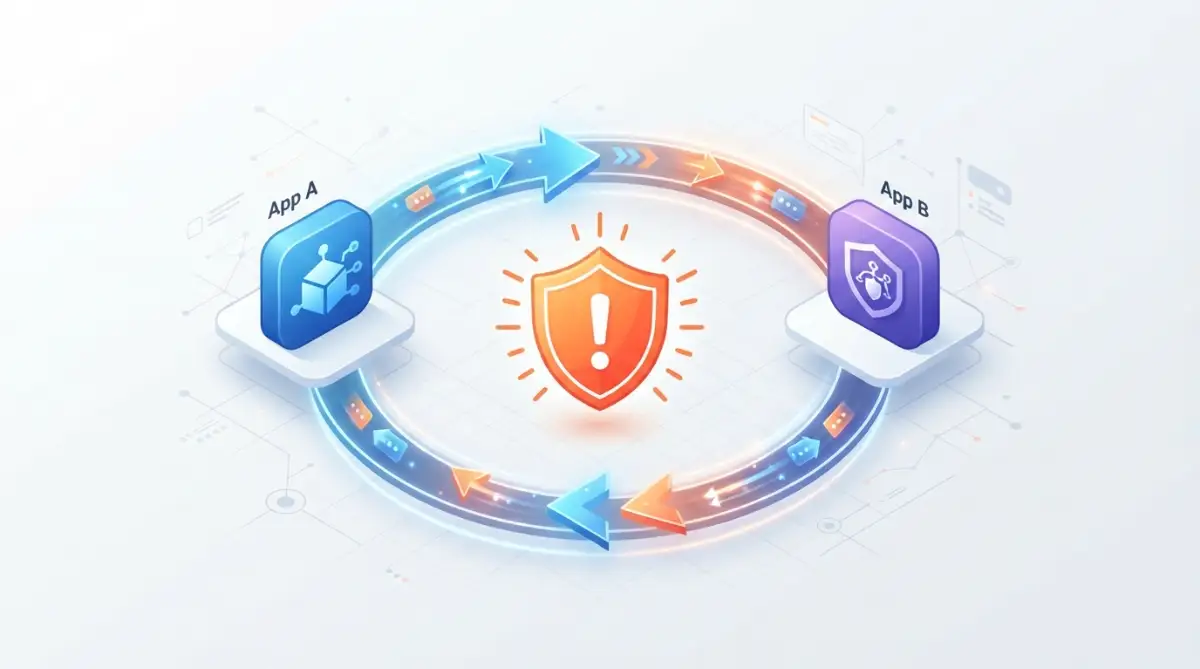
Always check your triggers carefully to ensure data travels in a clear, one-way direction. If you must set up two-way syncs, always insert a strict filter that stops the workflow if the new data matches the existing record.
Testing Live Automations with Real Customer Data
Another common mistake is activating a brand-new workflow directly on your live database without proper testing. People assume that because the steps look simple, nothing can go wrong during the handoff.
Sending unverified test triggers can accidentally dispatch real welcome emails to hundreds of existing customers at three in the morning. It can also create messy duplicate rows that take hours of manual work to untangle and delete.
Always create a dedicated test contact before turning on your public workflow. Submit real-world sample entries through your forms and review how the data populates across each connected screen.
Taking an extra five minutes to verify your results guarantees that your customers never experience an awkward communication glitch. Careful testing also helps when overcoming the learning curve when transitioning your team, because team members gain immediate confidence in the new automated workflow.
Ignoring Hidden Subscription and Task Limits
No-code workflow platforms make operations effortless, but every executed step consumes a tiny portion of your monthly plan. Beginners often link high-volume background activities that trigger thousands of unnecessary tasks every day.
If you connect an event that runs every time a website visitor scrolls a page, your account tier will expire almost instantly. Being mindful of operational overhead is just as important as knowing how to spot and prevent unexpected subscription renewals across your software toolkit.
Before turning on any automation, calculate the expected daily volume of that specific trigger. Reserve instant webhook connections for high-value events like purchases, form submissions, and direct customer requests.
For routine background summaries, consider running a scheduled batch query once a day instead. This balanced approach protects your budget while delivering fast results where they matter most.
Failing to Document Your Connections
When you build a workflow on a Friday afternoon, every step feels obvious and memorable. Six months later, you will have no idea why that specific filter exists or where that webhook link originates.
If a team member leaves or an app updates its layout, undocumented workflows become black boxes that people are terrified to touch. This creates silent complexity that can slow down your entire department.
Make it a rule to give every automation step a clear, descriptive name inside your builder. Instead of leaving a step labeled as "Webhook 1," rename it to "Send New Lead to Support Inbox."
Keep a simple shared spreadsheet that lists your active workflows, their origin apps, and their target destinations. A five-minute documentation habit saves days of stressful detective work down the road.
The Do's and Don'ts of Long-Term Software Integration
To keep your digital ecosystem healthy over time, refer to this straightforward checklist whenever you introduce a new tool to your stack:
- DO use clear, descriptive names for every trigger and action step so your teammates can understand your logic instantly.
- DO test your data bridges with realistic sample information before switching your automation to live status.
- DO establish dedicated error notifications so you are alerted the moment a platform connection requires your attention.
- DON'T create circular updates between two apps without strict conditional filters to block infinite loops.
- DON'T share raw webhook links in public forums or unencrypted team messages where unauthorized bots can find them.
- DON'T let unused test automations sit active in your dashboard where they can quietly consume your monthly task allowances.
Following these basic operational rules ensures your tools support your daily goals instead of demanding constant maintenance.
Building a Resilient Digital Foundation for Future Growth
When you master the art of connecting tools without writing code, your relationship with technology changes completely. You stop accepting software limitations as permanent roadblocks and start seeing apps as flexible building blocks.
Instead of waiting weeks for engineering resources, you can prototype a new workflow idea during your lunch break. You can test new marketing channels, launch client onboarding sequences, and automate payment receipts entirely on your own schedule.
This independence also allows you to be much more selective about the tools you purchase. You no longer need to buy massive, expensive all-in-one platforms that claim to do everything poorly.
You can pick the absolute best specialized tool for each individual job and link them together into a custom powerhouse. Even if you decide to stop coding to automate your work, you retain complete creative command over how your business runs behind the scenes.
As your team expands, your interconnected systems handle increased volume without breaking a sweat. A process that once required three extra hires can run quietly in the background, freeing your people to solve real customer problems.
The confidence that comes from building your own digital pipelines transforms how you work. You become the person who solves problems quickly, removes operational bottlenecks, and gets projects moving again.
Answers to Common Questions About Webhooks and APIs
Can I connect an old application that does not offer webhooks?
Yes, you can still link older platforms by setting up scheduled API requests through your visual automation builder. The builder can check the older app on a regular interval, such as every fifteen minutes, to pull any newly added records automatically.
Are webhooks completely safe to use for sensitive customer information?
Webhooks are safe when used with modern HTTPS encryption and secure access tokens. Established internet standards documented by the World Wide Web Consortium (W3C) require modern web communications to use transport encryption, ensuring that customer details remain protected in transit.
What is the practical difference between an API key and a Webhook URL?
An API key is a secure digital password that proves you have permission to request data from an application. A Webhook URL is a specific digital delivery address that receives incoming event notifications pushed directly from another service.
Will my automated connections stop working if an app updates its interface?
Regular user interface updates on an app will not affect your automated bridges because webhooks communicate directly with the background data layer. Your workflows will only require an update if the app developer makes major changes to their data fields, which they announce well in advance.
Your Action Plan for Digital Independence
You do not need to modernize your entire business operation in a single afternoon. The best way to build momentum is to find the single most annoying manual task on your desk today and eliminate it completely.
Find that one spreadsheet you update by hand, or that email address you paste into three different tools every morning. Open a visual workflow platform, generate a simple webhook link, and connect those two apps before you log off today.
Once you see your first automated test succeed, the hesitation will vanish. You will suddenly realize that you have the power to build a fully connected software system entirely on your own terms.
I spent months feeling powerless because I thought connecting software required a computer science degree. Taking twenty minutes to set up my very first webhook bridge changed my entire working life, and I know it will do the exact same thing for you today.
Disclaimer
This article is provided for educational and informational purposes only. The software integration methods, visual workflow platforms, and technical concepts discussed reflect general industry practices and may vary depending on specific software versions, subscription tiers, and third-party service policies. Readers are encouraged to review the security standards, terms of service, and documentation of their individual software providers before implementing automated workflows involving proprietary or sensitive personal information.