
The Midnight Panic: When Software Upgrades Turn Into Team Nightmares
Let us be honest, rolling out a new software tool to your team usually feels like walking into a buzzsaw. One day everyone is working fine, and the next day your inbox is full of angry messages because nobody can find the save button. Switching digital platforms should not ruin your weekend or make your best staff want to quit on the spot. If you are tired of watching your team panic over a new dashboard, let's look at why this happens and exactly how you can fix it without losing your mind.
Nobody knew where to submit their daily updates, several deadlines slipped immediately, and two of our best specialists threatened to quit. I felt like an absolute failure because I had assumed everyone would grasp the interface within an hour. That chaotic week taught me that changing digital tools is never just a technical upgrade.
It is really an emotional shock to daily work habits, personal confidence, and team trust. When an office switches platforms overnight, comfort vanishes into thin air. Team members suddenly spend twenty minutes hunting for an icon that used to take one second to click.
That friction drains mental stamina faster than a long day of physical work. People sit at their desks with tight shoulders and rising panic, wondering if they are suddenly bad at their jobs. That lingering dread follows them home, ruining their evenings and poisoning their dinner conversations.

The real tragedy is that leadership buys these tools to make everyday life easier, yet they spark panic instead. Stressed employees quietly abandon the new dashboard and run back to messy spreadsheets just to survive their afternoon. That quiet resistance breaks company momentum and leaves everyone feeling burnt out.
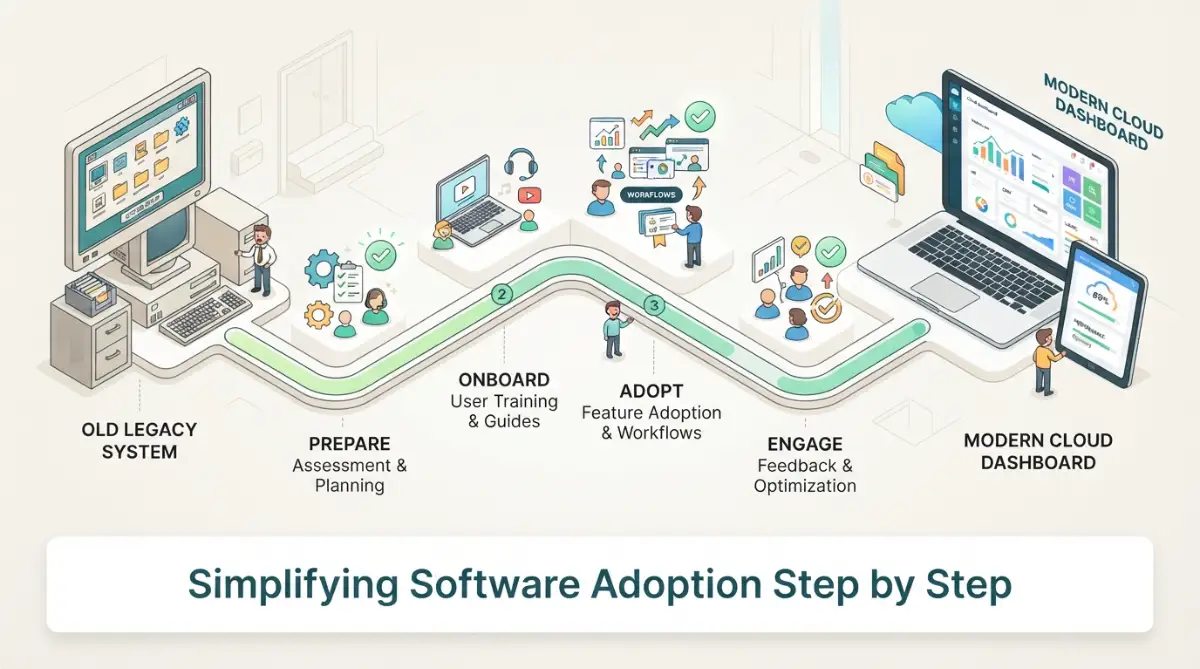
Quick Summary: What You Will Learn Today
- Why a sudden software switch makes smart people feel completely lost and stressed.
- How to find early testers to train your staff so you do not have to do it all alone.
- The simple trick of breaking software training into 10-minute daily pieces.
- Why you must pick a hard, firm deadline to turn off your old platform forever.
Why Human Minds Fight New Digital Dashboards
Your brain is designed to automate everyday repetitive actions to conserve precious energy. When you open a tool you have used for years, your hands move on pure autopilot. You click, type, and organize tasks without burning conscious mental power.
A new interface shatters that automatic routine and forces your brain to work in high-gear mode. Cognitive scientists call this habit disruption, and it naturally triggers irritation and defensive thinking. When every simple click demands full attention, productivity plunges, and self-doubt kicks in.
Understanding this biological reaction changes how you introduce changes to your staff. Instead of demanding instant compliance, you start treating tool adoption as a gentle habit rebuild. You give people room to breathe while their brains establish brand-new mental shortcuts.
Laying the Groundwork Long Before Launch Day
Solve a Shared Frustration First
Never surprise your team with a company-wide email announcing a software switch on Monday morning. That surprise creates instant distrust and puts everyone on the defensive before they even log in. Instead, start discussions weeks early by focusing on the headaches your team hates right now.
Show them exactly which annoying bottlenecks the upcoming system will eliminate from their daily grind. When people see that a new platform kills their boring manual work, they welcome it with open arms. They stop seeing an unwanted chore and start seeing a welcome relief.
Myth vs. Fact: The Software Rollout Reality
- Myth: Your team naturally hates learning new things.
- Fact: Your team simply hates feeling slow. If you can show them how the new tool saves them 20 minutes of boring work every single day, they will practically beg you for it.
Make the conversation entirely about saving their time rather than showing off fancy platform features. If the new tool cuts their weekly reporting time in half, highlight that specific win. Personal benefits always spark real curiosity and genuine buy-in.
Identify Your Internal System Guides
Every workplace has a few people who genuinely love playing with fresh apps and settings. Find these tech-curious teammates early and invite them to test the system before anyone else sees it. Let them click around, break things, and share their unfiltered feedback with you.
These early testers become your boots-on-the-ground champions during the actual rollout phase. When an everyday worker gets stuck, they usually prefer asking a desk neighbor rather than filing a formal tech ticket. Having trained guides sitting right beside your workers removes fear from the learning process.
Your champions also translate complex vendor language into everyday office terms that make immediate sense. They understand the real daily workflow because they live it alongside their peers. Their encouragement carries far more weight than any corporate slide deck ever could.
Structuring a Stress-Free Learning Experience
Break Training into Bite-Sized Daily Chunks
Throwing your staff into a six-hour weekend webinar is the fastest way to guarantee zero retention. Human memory fades rapidly when flooded with too many interface buttons and nested menus at once. People walk away from marathon training sessions feeling dazed, confused, and resentful.
Divide your onboarding program into short, ten-minute practical modules spread across two weeks. Dedicate Monday to simple account setup and basic profile navigation. Save task creation for Tuesday, and focus on team messaging features on Wednesday.
This gradual approach lets employees practice one tiny skill before adding another layer of complexity. Small daily victories build genuine momentum and keep frustration levels near zero. People feel capable, calm, and ready to explore the rest of the layout on their own terms.
I used to share fifty-page vendor guidebooks with my team, and nobody ever read past the first page. Now, I record simple two-minute screen videos that solve just one single daily task at a time. That simple change cut our confused support questions by more than half almost immediately.
Build a Safe Playground Environment
Fear of breaking things is one of the biggest reasons adults hesitate to explore new software. They worry that clicking the wrong button might wipe out client records or delete a shared project file. That hidden terror makes them move timidly or avoid using the platform altogether.
Set up an isolated testing area, often called a sandbox, loaded with dummy information. Tell your team explicitly that nothing in this practice space is real and nothing can be permanently broken. Encourage them to push random buttons, create silly mock tasks, and test strange settings.
Once employees realize that clicking around will not cause an office disaster, their curiosity returns. Playful exploration is the absolute fastest way for any human mind to master an unfamiliar tool. Confidence grows through hands-on experimentation, not through silent observation.
Watch this practical walkthrough to see how top teams organize smooth software migrations without disrupting their daily operations:
Comparing Common Migration Pitfalls with Smarter Approaches
A Quick Real-World Idea:
When a partner agency of ours switched to a new project tracker, they set up a "Frustration Jar" in the office. Every time someone could not find a basic feature, the company put a dollar in the jar. At the end of the month, they used the cash to buy lunch for everyone. It turned a stressful transition into a fun game, and it showed management exactly which buttons were too hard to find.
Redesigning Daily Work Expectations During the Shift
Temporarily Reduce Output Targets
You cannot expect normal work volume while your staff is busy learning an entirely different operating system. Expecting one hundred percent output during a system transition guarantees sloppy work and angry teams. It forces people to rush through new screens, making avoidable mistakes that take hours to clean up.
Intentionally trim planned project deliverables by twenty percent during the first two weeks of transition. Announce this adjustment openly so your workers know management supports their learning curve. That temporary breathing room relieves pressure and lets everyone focus on building proper platform habits.
When team members are not racing against urgent deadlines, they take time to set up their workspaces properly. They discover helpful keyboard shortcuts, organize their views, and learn the platform correctly the first time. That short-term dip in volume pays massive dividends in long-term speed.
Create an Open Question Channel
Set up a dedicated, casual chat room where employees can post quick questions without feeling embarrassed. Make it clear that no question is too basic, silly, or minor to bring up. When someone asks how to attach a file, answer promptly with kindness and a short screen grab.
Make this channel public to the whole team rather than handling questions through private direct messages. When one person is confused about a button, five other silent colleagues share the exact same confusion. Answering an issue in public educates the whole group at once and saves hours of repetitive troubleshooting.
Encourage teammates to help each other out in this shared channel whenever they know the answer. Public praise for coworkers who share helpful tips builds an uplifting culture of mutual support. Tool adoption shifts from an isolated struggle into a shared team adventure.

Solidifying the New Habits for the Long Run
Set a Generous but Firm Goodbye Date for Old Tools
Leaving old software active for too long is a silent trap that ruins countless SaaS migrations. If people can still access the old legacy tool, they will keep using it whenever they feel busy or tired. That splits company information across two different databases and creates a massive record-keeping mess.
Set a clear, transparent retirement date for the old software right from the beginning of the project. Give everyone three to four weeks of overlap to shift their data and get comfortable with the new environment. When that final day arrives, archive the old system and make it read-only for safety.
A firm sunset date removes ambiguity and encourages hesitant workers to make the final leap forward. It signals that the new software is a permanent upgrade, not an optional experiment that might disappear. Clear operational boundaries help teams commit fully to the modern workflow.
Celebrate Adoption Wins and Track Real Progress
Do not measure your transition success solely by user logins or basic account activations. A worker can easily log in, get frustrated, and close the browser tab five seconds later without doing any real work. Look closely at meaningful milestones, such as tasks completed, comments shared, and reports generated.
Celebrate teams that hit their adoption milestones ahead of schedule during regular team meetings. Give fun shout-outs to the employee who created the cleanest project board or shared the best workflow tip. Positive reinforcement drives engagement far deeper than corporate mandates or stern memos.
Review your workflows after thirty days to see where people are still running into small obstacles. Software optimization is an ongoing conversation, not a one-time setup checklist that you tuck away in a drawer. Fine-tuning settings based on direct user experience ensures the platform serves the team, not the other way around.
By respecting the human side of digital change, you transform a dreaded software switch into an energizing company win. Your employees stay calm, your operations remain steady, and your business captures the full value of its new tech investment.
Next-Level Tactics for Effortless Long-Term Platform Mastery
Getting your team to log into a new platform on day one is only half the battle. The real challenge is keeping everyone enthusiastic and consistent months after the initial hype fades away. True mastery happens when a platform feels like second nature rather than an awkward extra chore.
To reach that level of comfort, you need smarter systems that integrate the tool into everyday work. When a team uses software without stopping to think about where buttons live, efficiency skyrockets. Here are advanced strategies that top-performing workplaces use to secure permanent user adoption.
Build Contextual Cheat Sheets Inside the Workflow
Instead of forcing your staff to dig through bookmarked links or shared drives, bring guidance directly into their daily view. Keep simple, one-page reference cards pinned right inside the communication channels they already use every hour. When people can grab an answer in five seconds, they never build up mental resentment toward the platform.
Keep these quick guides focused on real jobs, such as updating customer records or sending invoices. Avoid technical jargon and stick to plain action verbs that tell people exactly what to click. When learning materials meet workers right where they work, hesitation disappears.
You can also use lightweight browser extensions to drop helpful hints directly onto complex dashboard screens. These small visual prompts guide users through multi-step forms without requiring manager intervention. It provides instant reassurance right when someone feels unsure about their next click.
Establish a Bi-Weekly Open Office Hour
Formal training seminars often fail because people forget lessons before they ever get a chance to use them. A far better approach is hosting an informal, drop-in session every two weeks where anyone can ask questions. Keep these gatherings relaxed and open so no one feels judged for asking basic questions.
During these sessions, encourage team members to share clever shortcuts they discovered on their own. Seeing a desk peer demonstrate a time-saving trick is ten times more convincing than listening to an outside consultant. It turns system training into an ongoing, organic team conversation.
This relaxed setting also reveals hidden friction points that leadership might otherwise miss. If four different employees ask about the same export button, you know that particular screen needs clearer internal guidelines. You catch small confusions before they snowball into workplace rebellion.
Connect the Tool to Real Business Rewards
People adopt new habits much faster when they see clear, tangible connections to their personal career growth. If mastering a tool helps a sales rep close deals faster or frees up hours for an analyst, celebrate that outcome loudly. Show how how modern cloud platforms automate your daily tasks and give staff more room for creative problem-solving.
Tie platform milestones to quarterly peer-recognition programs or internal skill badges. When an employee becomes the recognized expert on workflow automations, their confidence and standing among teammates grow. People love developing marketable operational skills that make their resumes shine.
According to research from the MIT Sloan Management Review, organizations that align digital tools with employee incentives see significantly higher rates of long-term technology adoption. When your team views software as an engine for their personal advancement, compliance takes care of itself. Adoption changes from an administrative demand into a personal win.
Conduct Quarterly Stack Audits to Prevent Tool Overload
One of the quickest ways to kill enthusiasm for a platform is piling on too many overlapping subscriptions. When employees must juggle five different apps just to complete a single project, attention scatters and burnout sets in. Take time every few months to review your active tool subscriptions and cut out redundant applications.
Cleaning up overlapping tools clarifies exactly where conversations, assets, and project updates belong. For actionable guidance on trimming unnecessary subscriptions, learn how to audit your software stack to reduce tool sprawl before it overwhelms your department. A lean, focused digital workspace helps everyone stay organized and calm.
When teams know there is one clear home for every type of task, mental resistance drops dramatically. They no longer waste energy deciding whether to post an update in a chat room, a board, or an email thread. Simplicity is the ultimate driver of consistent software usage.

Costly Traps That Derail Software Rollouts
The Danger of the Forced Cold-Turkey Switch
The single most destructive mistake a manager can make is cutting off legacy systems with zero transitional warning. Demanding that your entire department switch to a brand-new interface overnight creates instant panic. People feel robbed of their comfortable routines, which sparks immediate anger and quiet resistance.
When workers feel backed into a corner, they do not learn faster; they simply freeze up. Studies from the American Psychological Association show that sudden workplace disruptions drastically raise cortisol levels and harm complex problem-solving abilities. High stress makes it physiologically harder for your brain to build new cognitive maps.
Instead of an aggressive cutoff, design a phased bridge where both systems exist with clear boundaries for a brief period. Give people time to migrate their daily workflows without fearing that a missed step will ruin their performance reviews. Compassion during this transition phase builds lasting loyalty and goodwill.
Over-Customizing Dashboards on Day One
Many project managers get overexcited and turn on every single automation, tag, and custom field available in the settings menu. They build an intricate digital labyrinth before their team even understands how to post a basic comment. When an interface looks overwhelmingly busy, workers dread opening the tab.
Complex permission layers and twenty mandatory form fields slow down simple tasks that used to take seconds. Employees quickly view the new software as an annoying administrative barrier rather than a helpful tool. They start looking for shortcuts, skipping steps, and storing information in offline notes.
Always launch with the simplest possible configuration and keep optional features turned off. Let your team master the core workflow before introducing advanced tracking tags or automated triggers. Add complexity slowly, and only when your team explicitly asks for more structure.
Neglecting Cloud Security Hygiene During the Rush
When staff members scramble to learn an unfamiliar platform, security best practices often get tossed out the window. Frustrated workers frequently share administrative passwords over insecure chat channels or export sensitive client files to personal hard drives. In their rush to stay productive, they inadvertently create massive security vulnerabilities.
It is easy to overlook basic permissions when you are desperately trying to get team members up and running. Make sure your team understands how to secure your cloud storage files and manage user permissions right from their first login session. Good data protection habits must be built into everyday training rather than added as an afterthought.
Take time to review role-based access levels so employees only see the data they actually need for their specific jobs. This protection keeps proprietary records safe while making the interface cleaner and less intimidating for new users. Fewer visible menus mean less confusion for everyday workers.
Treating Feedback as Annoying Complaints
When employees speak up about clunky menus or confusing workflows, bad leaders treat it as whiny pushback. Dismissing genuine user frustration creates deep bitterness and causes workers to shut down communication completely. Once your staff stops sharing their honest experiences, you lose the ability to fix broken processes.
User experience research by the Nielsen Norman Group highlights that employee feedback during software rollouts is essential for identifying workflow bottlenecks. Listening to your staff provides ground-level data that software vendors will never see. It shows you where the platform clashes with real customer deliverables.
Set up a simple suggestion form or dedicate ten minutes during team meetings to hear what feels clunky. When staff members see you modify a setting or simplify a form based on their input, they feel valued. They become active partners in making the transition successful.
Action Plan for Long-Term Digital Success
Week-by-Week Momentum Checklist
- Week One: Exploration and Confidence Building
- Focus purely on navigation, account setup, and basic personal settings. Do not enforce rigid output quotas or complex tagging rules. Allow team members to explore menus and ask basic questions without judgment.
- Week Two: Core Task Migration
- Move simple daily tasks into the new platform while keeping help channels wide open. Pair struggling teammates with internal champions who can offer gentle guidance. Celebrate small workflow milestones during daily check-ins.
- Week Three: Introducing Smart Automations
- Introduce basic time-saving shortcuts and show how smart tools improve team collaboration across departments. Help team members customize their notification settings so their inboxes do not get flooded. Address lingering confusion in a friendly group office hour.
- Week Four and Beyond: Optimization and Routine Maintenance
- Archive old legacy tools and make historical records read-only to prevent backsliding. Review user analytics to see which features provide genuine value and which ones create bottlenecks. Keep tweaking settings to match your team's evolving working style.
A Practical Perspective on Leading Change
Adopting new software is fundamentally a test of team empathy, patience, and clear communication. The platforms we use will always change, update, and evolve as digital technology advances. What remains constant is the human need to feel supported, capable, and respected while learning new things.
When you lead with patience and celebrate small steps, your team develops deep digital resilience. They stop dreading system updates and start viewing new tools as exciting opportunities to simplify their workload. That confidence turns your workplace into an agile group ready for any technological shift.
I have watched entire teams transform from stressed, frustrated skeptics into enthusiastic platform advocates simply because leadership gave them the patience and space to learn. Give your coworkers that same grace today, and watch how quickly their confidence and daily productivity soar. You have all the tools you need to make this transition your team's easiest win yet.
Real Answers to Common Software Transition Questions
How long does it usually take for a team to feel comfortable with a new platform?
Most teams need about three to four weeks of consistent, supported usage to build strong muscle memory in a new system. The first week is usually awkward, but confidence grows rapidly once daily tasks become familiar. Keeping support channels open during this initial month ensures a smooth and permanent adjustment.
What should I do if a team member completely refuses to use the new software?
Sit down with the hesitant employee one-on-one and listen to their specific worries without getting defensive. Often, refusal stems from a fear of looking slow or an anxiety that the tool makes their job harder. Walk through their specific daily tasks together, showing them how the platform directly saves them time and headache.
How do I stop employees from quietly returning to their old spreadsheets?
Make your new platform the single source of truth by requiring all project approvals and status updates to happen inside it. If someone emails you a spreadsheet or status update, gently ask them to drop the link into the new dashboard instead. Once old habits stop getting rewarded, people naturally transition to the shared workspace.
Should we run old and new systems at the same time?
A brief overlap of one to two weeks is helpful for migrating active records and testing workflows safely. However, running both systems for longer than a month creates confusion, split records, and massive data clutter. Set a firm, clear sunset date early so everyone works toward the same timeline.
How can small teams handle training without a dedicated IT department?
Small teams can use peer-to-peer mentoring and short, recorded video walkthroughs instead of expensive training packages. Assign your most tech-comfortable employee to test the system first and share practical screen recordings of everyday tasks. This informal approach is faster, cheaper, and far more relevant to your daily operations.
Editorial & Safety Disclaimer
The software onboarding recommendations, operational strategies, and management workflows shared in this article are provided for informational and educational purposes only. Every business maintains unique team dynamics, technical infrastructure, and regulatory requirements that may demand customized deployment plans. Always review platform terms of service, evaluate internal security protocols, and test software configurations in a safe staging environment before rolling out major operational changes across your organization.