The Embarrassing Boardroom Demo That Changed How I Look at AI
A generic AI tool almost cost my company forty thousand dollars last spring. During a live test with our leadership team, the bot confidently stated that all enterprise clients get full cash refunds for ninety days—a policy that never existed. That single incident showed me why off-the-shelf language models cannot be trusted with company operations. If you want an AI assistant that cites your real handbooks and contracts without making things up, you need a retrieval pipeline instead of blind model prompts.
My team had spent weeks connecting a popular commercial language model to help our operations team pull answers quickly. When our CEO asked the tool to summarize our exact refund policy for enterprise contracts, the screen froze my heart.
The tool confidently printed out a completely fictional policy that promised unlimited cash refunds within ninety days.
That sentence alone would have cost our company tens of thousands of dollars if a customer support agent had shared it with a client.
I rushed to close the laptop screen while stammering out an apology about unexpected algorithmic drift.
In that quiet room, I realized that off-the-shelf bots do not understand your business; they only know how to sound persuasive.
Quick Takeaways for Busy Leaders
- RAG beats fine-tuning: Giving an AI model your current company files works faster, costs far less, and stops made-up answers.
- Clean your data first: Old drafts and messy spreadsheets will wreck your answers; clean the source before indexing.
- Use hybrid search: Pair exact keyword matching with vector search so serial numbers and specific clauses do not slip through the cracks.
- Lock down permissions: Set user-level access filters at the search layer so sensitive files stay hidden from unauthorized eyes.
Why Standard Language Tools Keep Failing Your Team
Generic machine models behave like brilliant interns who spent years memorizing every book in the world library except your internal company handbook.
When you ask them about general world history or writing assistance, they sparkle with surprising wit and speed.
The moment you hand them your proprietary product catalog, pricing sheet, or HR handbook, their confidence turns dangerous.
They do not admit what they do not know. Instead, they make up plausible answers out of thin air to satisfy your prompt.
In technical circles, we call this a hallucination, but in business, it is a plain liability.
You cannot run a company where team members spend three hours verifying every single sentence produced by their productivity software.
The Cost of the Endless Information Hunt
Think about the sheer number of hours your team loses every single week hunting down old documents.
A sales representative spends forty minutes digging through three different cloud storage folders just to find last quarter's master services agreement.
Support staff paste questions across five different team chat channels hoping an experienced engineer notices their message before lunch.
Important institutional wisdom remains trapped inside the minds of two senior employees who are constantly interrupted by routine questions.
This friction creates real mental fatigue. People end up frustrated, projects slow down, and customer trust erodes with every inaccurate email sent out.
What Retrieval-Augmented Generation Actually Means
Retrieval-Augmented Generation, commonly called RAG, is an architectural framework that stops language models from guessing.
Instead of asking the model to rely solely on its pre-trained memory, RAG transforms the model into an open-book student.
Imagine sitting down for the hardest final exam of your life.
A traditional model attempts the test purely by memory, often confusing details from different textbooks when memories blur.
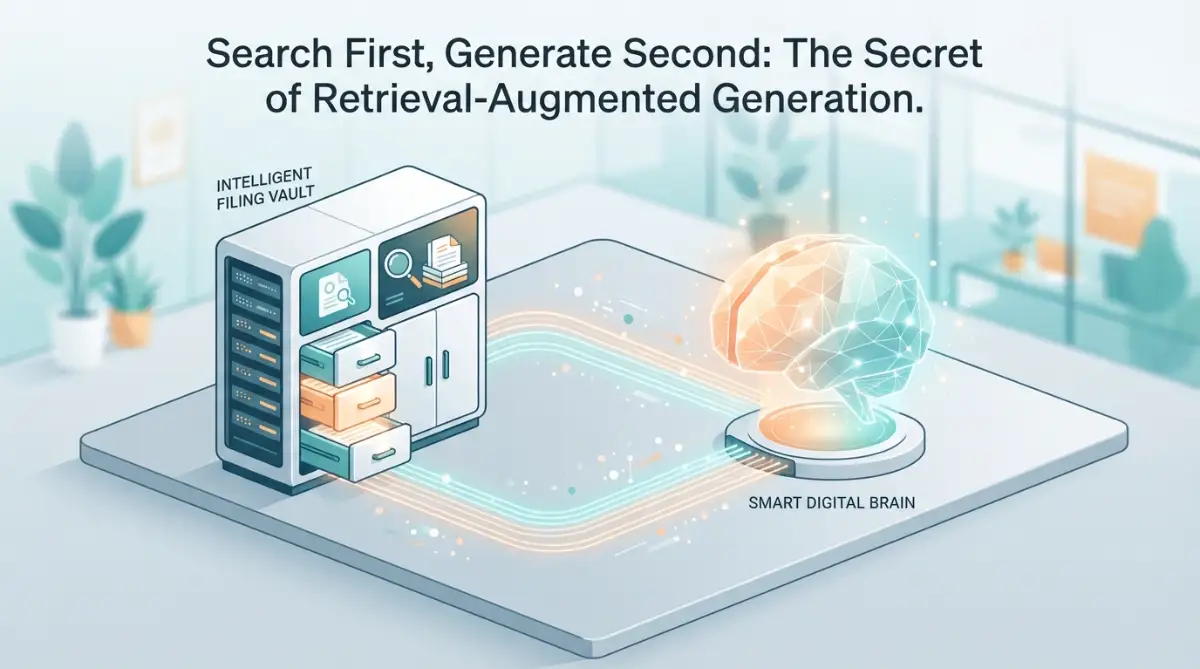
A RAG system gives the student access to your company filing cabinet right beside their exam desk.
Before answering any question, the system searches the cabinet, pulls the exact relevant page, reads it carefully, and quotes from it directly.
How the RAG Pipeline Turns Documents into Actionable Intelligence
Plain English RAG Workflow: Parsing -> Chunking -> Vector Search -> Prompt Injection -> Verified Answer
The system begins by gathering your scattered business documents from wherever they live.
This includes cloud folders, help desk archives, Notion pages, intranet wikis, and structured spreadsheet sheets.
The software reads these raw formats, strips away messy formatting, and breaks long files down into digestible pieces known as chunks.
Smart Chunking: Why Document Size Dictates Accuracy
You cannot feed an entire three-hundred-page operations manual into a single search query without confusing the underlying engine.
Smart chunking splits text into bite-sized passages, usually running between two hundred and five hundred words each.
Each piece keeps a slight overlap with neighboring text so sentences do not lose their natural context midway through an explanation.
If a paragraph explains your cancellation policy, the chunk retains the surrounding clauses so the tool knows exactly which product line it covers.
Here is a quick cheat sheet I use when setting up chunk windows for internal documents:
- Small Chunks (100 to 200 words): Best for FAQ pages and quick glossary lookups. High speed, but misses surrounding policy context.
- Medium Chunks (300 to 500 words): The sweet spot for HR handbooks, standard operating procedures, and product guides.
- Large Chunks (800+ words): Great for legal agreements, but dilutes vector relevance and crowds your context window.
Transforming Words into Mathematical Meaning
This is where embedding models step in to perform quiet magic.
An embedding model reads each chunk of your company text and converts it into a long string of numbers known as a vector.
These numbers map the conceptual meaning of your text into a multidimensional map.
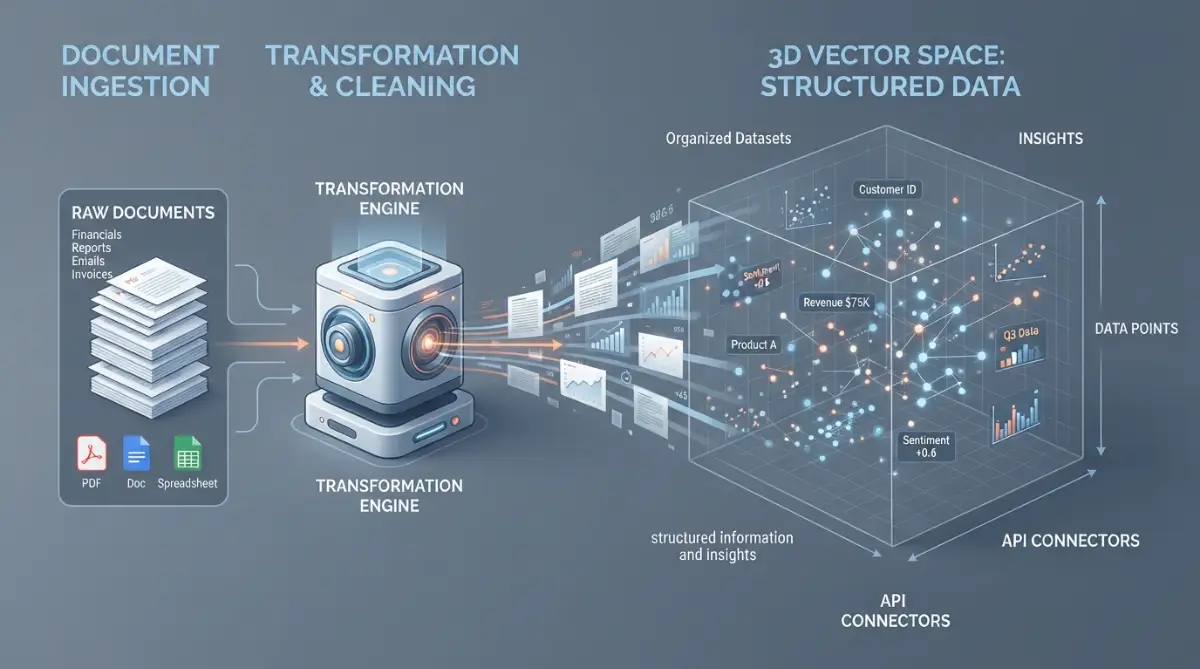
In this mathematical space, words like "revenue" and "quarterly earnings" sit right next to each other, even if they do not share identical letters.
Storing Meaning Inside Vector Databases
Once your internal content turns into vectors, the system saves them in a specialized storage engine known as a vector database.
Unlike older databases that search for exact word matches, a vector database looks for semantic intent.
When an employee searches for "how do I take time off for surgery," the database instantly recognizes the underlying concept.
It matches the question to your HR document titled "Medical Leave Policy" even though the user never typed the word "policy."
The Three-Step Dance of Every RAG Interaction
Every time a team member types a prompt into your private tool, a clean, lightning-fast sequence takes place behind the scenes.
First comes the Retrieval Phase.
The user prompt converts into an embedding vector and scans your vector database for the closest semantic matches.
The system grabs the top three to five most relevant passages from your actual internal documents.
Second comes the Augmentation Phase.
The system builds a brand-new prompt combining three distinct ingredients: your security instructions, the retrieved document snippets, and the user original query.
It explicitly instructs the model: "Answer the user question using ONLY the provided facts below. If the answer is not in the text, say you do not know."
Third comes the Generation Phase.
The language model reads the combined prompt and constructs a clear, conversational answer backed by your actual documents.
Because the facts sit directly in front of the model, it does not need to guess or invent rules.
Fine-Tuning vs. RAG: Which Approach Makes Sense?
Many business owners mistakenly believe they need to train or fine-tune their own custom artificial intelligence model from scratch.
Model fine-tuning resembles sending a student to medical school for seven years; it is expensive, slow, and changes how the brain reasons.
RAG, by comparison, resembles handing an already articulate researcher a folder filled with your company memos.
Fine-tuning changes behavior, while RAG provides factual knowledge.
Unless you are teaching an algorithm a rare dialect or specialized chemical notation, RAG delivers better results at a fraction of the cost.
Real-World Workplace Scenarios Where RAG Outperforms Everything
Lightning-Fast Customer Support Onboarding
Customer support departments experience painful turnover, leaving new hires drowning in hundreds of product updates.
With a private RAG assistant running on top of resolved ticket histories and product manuals, support reps find answers in seconds.
The tool drafts accurate replies matching current warranty terms, complete with citations pointing directly to internal knowledge links.
First-response resolution rates climb while training periods shrink from months down to a couple of days.
Instant Legal and Contract Analysis
Legal teams spend countless hours reviewing past non-disclosure agreements and client contracts during acquisition reviews or renewals.
A RAG architecture lets legal teams query thousands of existing agreements simultaneously.
An attorney can ask, "Show me every signed agreement that limits our liability to less than six figures."
Within moments, the tool lists the exact contract clauses, document names, and execution dates without any guesswork.
Engineering Architecture Discovery
When software teams scale, institutional architectural knowledge often sits scattered across disconnected repositories.
New developers spend hours tracking down why a legacy database was configured in a certain way five years ago.
RAG indexes old pull requests, technical tickets, and design documents into a searchable developer assistant.
Engineers get immediate context about system dependencies, allowing them to ship updates without breaking legacy pipelines.
Practical Safeguards for Real Business Operations
Building an internal AI is not merely about plugging documents into a database; it requires common sense operational boundaries.
A proper business setup must respect user permissions at every stage of the retrieval process.
An intern querying the system should never see snippets pulled from executive payroll records or confidential merger discussions.
Modern enterprise tools solve this by applying metadata filters during the retrieval phase.
The system checks the user identity credentials before performing the vector search, ensuring private files remain invisible to unauthorized eyes.
Pro Tip for Information Architecture
When I first rolled out an internal document pipeline, I made the painful mistake of feeding our entire messy archive into the vector database on day one.
I soon discovered that out-of-date policies from years ago were outranking our newer rules because both discussed identical topics.
Take the time to archive or tag outdated company documents before building your index; clean input data is the single best predictor of accurate answers.
Common Myths About Enterprise RAG Systems
Myth 1: Our Private Company Secrets Will Leak to the Public
Many executives worry that uploading sensitive client proposals into an AI system exposes their trade secrets to public web users.
When you use enterprise-grade API connections and private vector storage, your data is never used to train public models.
Your private documents reside in your own secure cloud container, shielded behind company firewalls and standard encryption protocols.
The external model simply reads the temporary prompt snippet in memory and erases it the moment the response generates.
Myth 2: RAG Requires a Massive In-House Data Science Team
A few years ago, building this type of search pipeline required seasoned machine learning engineers and custom infrastructure.
Today, modern software services allow teams to connect their existing storage tools to pre-built search engines in an afternoon.
You do not need to build vector search algorithms yourself; you simply select reliable managed components and connect them logically.
Practical Steps to Start Organizing Your Internal Knowledge Today
You do not have to index every corner of your enterprise to see immediate productivity gains from modern retrieval techniques.
Begin with a single, high-friction department where information bottlenecks slow down daily business operations.
Customer support, internal IT help desks, and sales enablement are prime testing grounds for quick wins.
- Identify the single source of truth for your chosen department, whether it lives in an internal wiki or a shared document drive.
- Delete or archive outdated, conflicting drafts so your team works exclusively from approved, accurate guidelines.
- Organize files by clear categories and use descriptive file titles that reflect the real questions your staff asks daily.
- Select an enterprise-focused software tool that supports vector search with role-based document access controls.
- Test the system thoroughly with ambiguous questions to verify that the tool admits when information is missing rather than inventing facts.
When you ground artificial intelligence in your internal facts, you eliminate the fear of embarrassing corporate hallucinations.
Your team gains an assistant that speaks with company authority, works at machine speed, and respects private records at all times.
Unlocking Precision: Advanced Architectural Tactics for Company Knowledge Engines
Moving beyond a basic test setup requires a shift in how your system thinks about queries.
Simple vector matching often stumbles when an employee searches for a specific part number or an exact legal clause.
To build a reliable corporate assistant that stands the test of time, you need architectural layers that refine raw queries before they ever touch your language generator.
Merging Keyword Match with Semantic Search
Pure semantic vector search excels at understanding concepts, but it can struggle with exact keyword matching.
If someone types a specific ticket identifier like "INV-9042," a vector database might pull up generic invoicing manuals instead of that specific bill.
This is why high-performing systems implement hybrid search, pairing dense semantic vectors with classic sparse keyword algorithms like BM25.
Sparse search locks onto exact strings, serial numbers, and client names.
Meanwhile, semantic search uncovers the broader contextual meaning behind the prompt.
Combining both scores guarantees that your assistant catches exact document references without missing conceptual intent, a strategy detailed in Pinecone's architectural research on hybrid search.
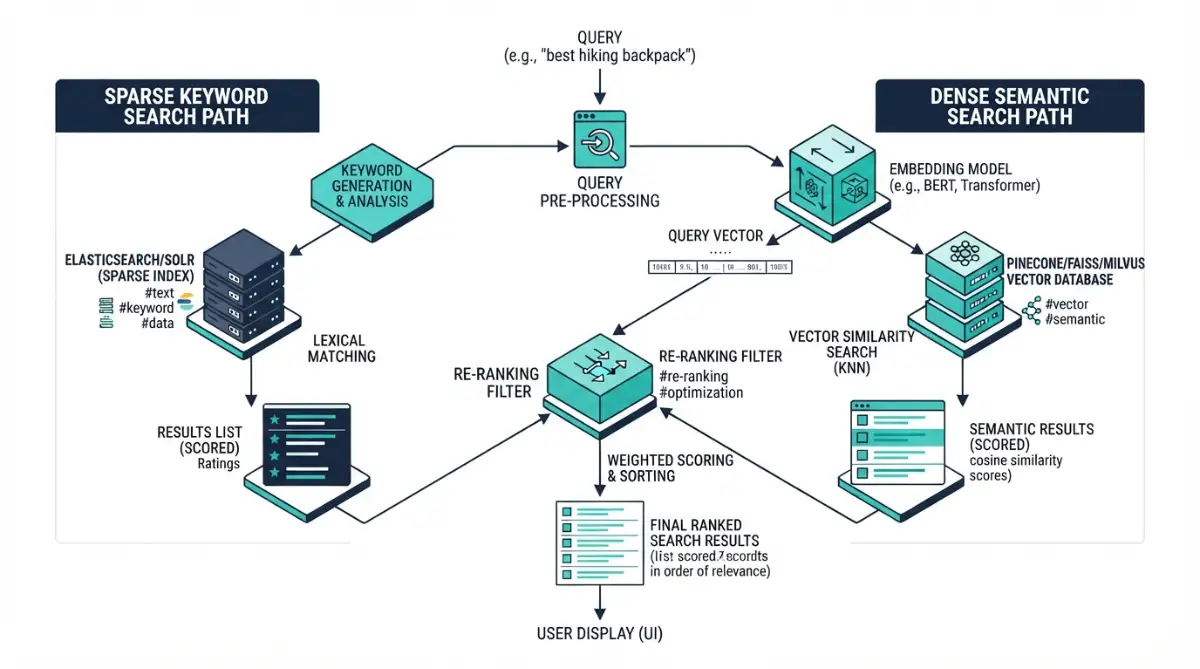
Introducing a Smart Re-Ranking Filter
When your vector engine pulls the top twenty document snippets, they are rarely ordered by genuine relevance.
Many pieces simply share superficial vocabulary with the user question.
Adding a dedicated re-ranking model between the retrieval step and the generation step solves this problem completely.
The re-ranker evaluates each candidate passage directly against the user query as a single pair.
It calculates a deep semantic compatibility score, discarding filler text and pushing the two or three most accurate answers to the very top.
This process stops the main language model from getting confused by noisy, semi-related document fragments.
Eliminating the "Lost in the Middle" Phenomenon
Large language models suffer from an attention blind spot known as context degradation.
When you place helpful facts in the dead center of a massive prompt, the model tends to overlook them while focusing on the beginning and end.
Researchers at Stanford demonstrated this cognitive flaw in language models, proving that information placement directly dictates recall accuracy.
To overcome this, configure your retrieval pipeline to place the highest-scoring text passages at the very beginning and very end of the injected context prompt.
By strategically positioning retrieved facts, you ensure the answering engine gives maximum attention to your primary business policies.
Dynamic Metadata Tagging and Time-Decay Scoring
Business information is not static; it changes every time your leadership updates a policy or releases a product revision.
If your repository contains an active return policy alongside three archived drafts, standard vector search might treat them as equally valid.
You can fix this by attaching structured metadata tags to every single document chunk.
These tags should track the creation date, author department, product line, and document lifecycle state.
Implement an automated time-decay multiplier in your retrieval algorithm.
This mathematical rule lowers the relevance score of older documents when a newer version covering the exact same subject exists in the database.
Splitting Complex User Queries Automatically
Employees rarely ask simple, single-topic questions when troubleshooting tricky issues.
A support representative might ask: "Did we change our standard cancellation window, and how does that affect international clients on quarterly billing?"
Passing that compound sentence directly into a vector search produces messy, unfocused document matches.
A mature knowledge framework uses a lightweight routing model to break multifaceted questions into two separate search queries.
The engine retrieves facts for the cancellation window first, then pulls billing guidelines for international clients, and finally synthesizes both into one coherent reply.
This workflow mirrors how autonomous agents in enterprise workflows systematically resolve multi-layered challenges.

Severe Pitfalls That Break Internal Knowledge Systems
Building an internal knowledge pipeline without clear operational guardrails invites quiet chaos.
When things go wrong, the breakdown rarely happens inside the language model itself.
The real failures originate in messy source material, unchecked user permissions, and poor data sanitization.
The "Garbage In, Hallucination Out" Spiral
The fastest way to wreck employee confidence in an internal tool is feeding it unfiltered document folders.
Many teams dump messy shared drives directly into a vector database without conducting an initial audit.
Outdated brainstorm notes, half-finished contract drafts, and speculative slack logs end up mixed with verified operating guidelines.
When your assistant reads contradictory sources, it tries to bridge the gap by fabricating compromise policies.
Always enforce strict data hygiene before indexing files, drawing from fact-checking protocols for business research to establish rigorous document verification standards.
The Catastrophic Permission Blind Spot
Imagine a curious entry-level employee playfully asking your internal assistant about upcoming compensation adjustments or executive bonuses.
If your retrieval pipeline lacks document-level access controls, the search engine will happily read executive compensation memos and summarize them in the chat.
This single operational oversight can create internal panic, destroy workplace morale, and violate employment privacy laws.
Never feed private documents into an index without enforcing identity-aware access controls.
Every retrieval call must check the security group of the active user before fetching snippets from restricted storage buckets.
Following basic principles for protecting proprietary company data protects your organization from accidental internal disclosure.
Treating Tabular Data Like Regular Text
Vector embeddings are exceptionally good at understanding narrative sentences and conversational memos.
They are remarkably bad at understanding numbers arranged inside complex balance sheets and inventory grids.
When a standard chunker chops a spreadsheet into text fragments, it separates header rows from their associated numeric values.
The model sees an isolated number like "$14,000" but loses the column label that identifies it as an annual software expense.
For structured databases and spreadsheets, skip text vectorization entirely.
Connect your assistant to SQL endpoints or structured query layers instead, so the model retrieves structured metrics through verified database queries rather than loose semantic guesses.
My Golden Rule for Numeric Files: If your team lives inside monthly spreadsheets, convert your core data points into clean markdown tables with repeating row headers before you embed them. Better yet, run a text-to-SQL layer for inventory counts. Feeding raw, messy workbooks into an embedding engine is the fastest way to get completely wrong numbers.
Blindly Trusting Generic SaaS Out-of-the-Box Settings
Many off-the-shelf software packages promise instant document intelligence with a single toggle switch.
These generic setups frequently rely on tiny context windows and weak similarity metrics designed to save computing costs.
As a result, they pull generic sentences that only loosely align with the user question.
Your employees quickly spot the lack of depth, dismiss the tool as a toy, and return to manual document searches.
When evaluating software tools, look closely at how the vendor handles index updates, vector storage, and data isolation.
Be sure you understand how cloud platforms encrypt your files before uploading internal company documentation to third-party engines.
Do's and Don'ts for Sustainable Company Knowledge Management
Maintaining an intelligent retrieval pipeline is an ongoing operational commitment, not a one-time technical installation.
Use this practical field checklist to keep your system fast, safe, and factually grounded as your organization grows.
What You Must Do
- Establish clear document ownership: Assign every department wiki page and standard operating procedure to a named team owner responsible for monthly reviews.
- Force visible citation links: Ensure your AI interface always displays clickable reference links pointing to the exact internal source document behind every generated sentence.
- Track query failure logs: Review searches where the system returned zero results so your documentation team knows which help articles need to be written next.
- Audit compliance protocols regularly: Ensure all data pipelines match security benchmarks set forth in the NIST AI Risk Management Framework to minimize institutional operational exposure.
- Provide human fallback paths: When training customer support bots, always provide an instant way for users to escalate unresolved questions to an actual human specialist.
What You Must Avoid
- Do not dump messy archives into vector stores: Never upload raw system backups or personal note folders without prior sanitization and deduplication.
- Do not ignore latency metrics: Keep total retrieval and generation cycles under four seconds; slow assistants frustrate users and kill daily adoption.
- Do not skip prompt constraints: Never omit negative constraints like "State that you do not know if the provided documents lack the answer" from your system instructions.
- Do not assume one size fits all: When comparing open-source models with proprietary SaaS, choose the infrastructure model that fits your company data governance rules rather than following internet hype.
A Practical Roadmap for Transforming Your Business Data
The journey toward an intelligent internal knowledge engine does not demand millions of dollars or years of speculative engineering.
It requires treating your business documentation as a structured asset rather than a disorganized digital junkyard.
When you organize your company policies, chunk them sensibly, and pair them with a retrieval architecture, something remarkable happens.
Your employees stop wasting hours chasing outdated files across chaotic chat rooms.
New hires ramp up their productivity in days instead of months because reliable operational guidance is always one query away.
Most importantly, your business leadership gains complete peace of mind knowing that automated systems only speak verified company facts.
When I started cleaning up our internal documentation years ago, the task felt completely overwhelming and tedious.
Taking that first step to organize our core customer support policies changed everything for our daily team sanity.
Start small with one single departmental handbook today, test your prompts patiently, and watch how quickly your team begins to trust private artificial intelligence.
Answers to Common Questions About Internal Business RAG
How quickly does an internal RAG assistant reflect document updates?
Because RAG searches your vector database rather than retraining the model weights, changes appear almost instantly.
Once you upload an updated policy file, the system chunks and embeds the text in a few seconds.
The very next employee query on that topic will retrieve the newly uploaded guidelines immediately.
What type of files can I safely feed into a retrieval pipeline?
Modern document parsers easily process PDF files, Word documents, plain text markdown, and scanned images using optical character recognition.
Internal wikis, customer support tickets, and shared knowledge pages are ideal formats for text retrieval.
Avoid feeding raw, unstructured spreadsheets directly into text search; use dedicated database connections for financial ledgers.
Can our team run RAG entirely on private offline hardware?
Yes, companies with strict regulatory requirements frequently deploy retrieval systems inside private cloud perimeters or on-premises servers.
You can pair local vector databases with self-hosted open models that run without sending bytes to external web services.
This guarantees that sensitive files never cross external network perimeters under any circumstance.
Why is RAG preferred over traditional fine-tuning for business facts?
Fine-tuning adjusts the tone and grammatical cadence of a model, but it is deeply unreliable for storing specific corporate facts.
Retrained models still hallucinate, cannot quote their sources, and cost significant computing resources to update.
RAG keeps your underlying facts separate from the language generation engine, providing verifiable citations and near-instant updates at low cost.
How do we stop the system from leaking executive files to general staff?
You enforce strict role-based access control filters at the vector retrieval layer before searching documents.
When a user submits a prompt, the system queries only the file chunks that match their specific clearance level.
Unauthorized files remain completely invisible to the search engine, making accidental disclosure mathematically impossible.
Editorial Disclaimer
This guide is provided strictly for educational and informational purposes. Implementing data management software and automated machine retrieval frameworks requires careful evaluation of your company specific regulatory obligations, data privacy standards, and information security posture. Always consult qualified IT governance, cybersecurity, and legal professionals before connecting internal company documentation to any algorithmic processing platform.