
The Breaking Point of Copy-Paste Automation
If you spend half your workday copying text out of a chat box and pasting it into five other tabs, your tools are broken. We were promised artificial intelligence that would give us our time back, but most of us just became full-time editors for a machine that cannot open a spreadsheet. Chat windows only talk, but autonomous agents actually finish jobs. Here is how you can hand off the digital busywork and take back your focus.
Most office workers are quietly drowning in this exact same trap right now. We were told smart chat systems would take away the boring parts of our daily jobs. Yet, millions of people find themselves baby-sitting software that forgets context the second you close the browser window. You ask a question, you get a polite paragraph of text, and then you still have to do all the heavy lifting yourself.
This constant back-and-forth drains your mental energy long before lunchtime arrives. You lose your train of thought every time an assistant gives you generic advice instead of finishing an assignment. The pressure builds up because your manager expects faster output simply because the company pays for smart tools. When the software only talks without taking action, the burden falls right back onto your shoulders.
The problem is not that workers refuse to adapt to new technology. The problem is that basic conversational tools were never designed to handle complex office operations. They were built to predict words, not to understand business outcomes or follow up on multi-step projects. We ended up with digital chatterboxes when what we actually needed were reliable helpers.
Real relief begins only when we stop expecting conversational toys to do the work of true digital partners. The shift happening across software today is moving away from endless text boxes toward systems that actually carry out assignments from start to finish. Once you understand this shift, you can stop wasting hours managing chat prompts and start reclaiming your personal focus.
Quick Takeaways: What You Need to Know
- Chatbots Talk, Agents Work: Standard chatbots wait for prompts and write words. Autonomous agents break big goals into steps and carry them out across your apps.
- Stop Writing Endless Prompts: Shift your daily energy from asking clever questions to setting safe permission rules and clear project finish lines.
- Always Keep Humans in Charge: Never grant full write access to core systems on day one. Keep manual approval gates on money, emails, and client records.
- Clean Notes Make Smarter Tools: Your agents are only as smart as your shared team files. Keep standard operating guides clean and updated.
What Makes an Autonomous Agent Different from a Regular Chatbot?
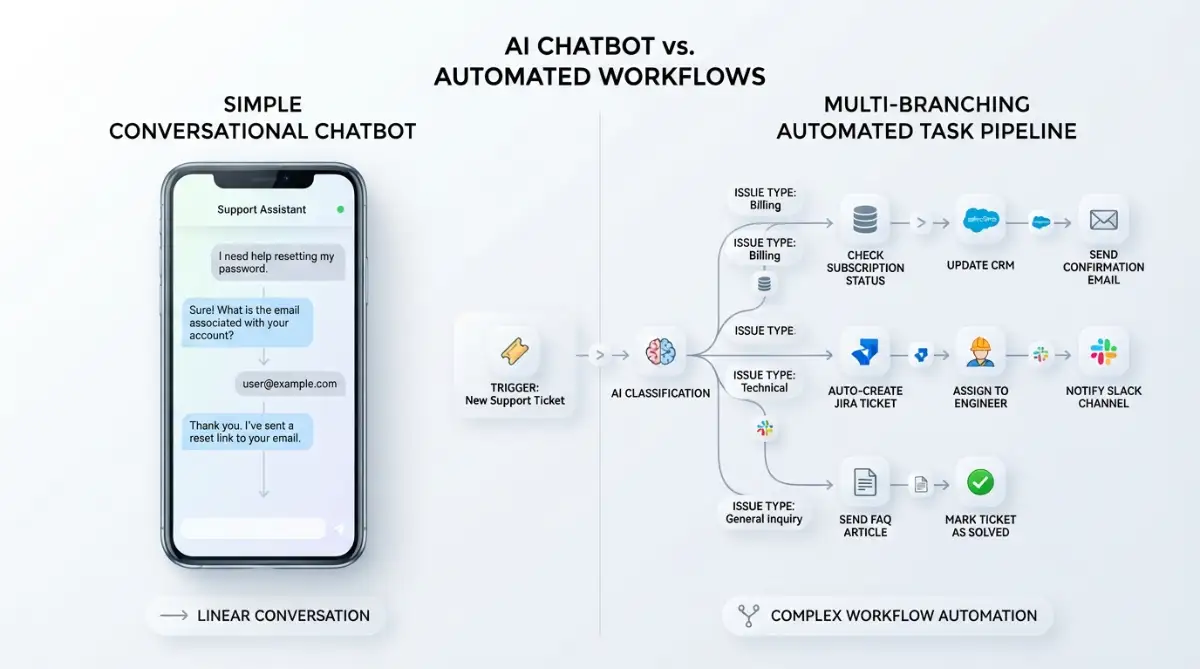
To understand where your daily software tools are going, you must separate talk from action. A standard conversational tool is reactive by design. It waits quietly in the corner until you type a prompt, offers a helpful response based on patterns, and then immediately forgets what just happened.
An autonomous system operates with a completely different logic. Instead of just answering your message, it takes a clear goal, breaks that goal into smaller tasks, and uses other software tools to complete those tasks. It checks its own progress, corrects its own errors, and updates your records without needing you to hold its hand.
Standard Chatbot Workflow:
User Prompt -> Language Model -> Text Answer (User does the manual work)
Autonomous Agent Workflow:
User Goal -> Plan Steps -> Use Apps & APIs -> Verify Output -> Complete Project

Think of a traditional helper as an eager dictionary sitting on your desk. You can ask it to define words, rewrite an email draft, or summarize a long article. However, it cannot log into your spreadsheet, cross-check client records, email the accounting department, or update your calendar.
An agent acts more like an apprentice sitting beside you. When you tell an agent to prepare an onboarding package for a new client, it does not just write a friendly greeting letter. It opens your database, creates a project folder, uploads standard files, alerts your team in chat, and schedules the kickoff call.
This difference changes your relationship with the screen in front of you. You stop being the glue that connects five disconnected web apps together. Instead, your primary role moves from manual operator to thoughtful director.
The Real Cost: Onboarding One New Client
- Manual Human Steps: 45 minutes spent gathering files, emailing invoices, making folders, and setting up calendar links.
- Standard Chatbot: 30 minutes spent writing prompts, generating welcome emails, and still manually copying links into three platforms.
- Autonomous Agent: 2 minutes spent reviewing a summary alert and clicking a single approve button while the system runs the background sync.
When I ran this test with my own client accounts, our onboarding errors dropped to zero in the first week. You stop playing traffic cop between web tools and spend that extra hour talking to your actual customer.
The Three Core Pillars That Power True Software Agents
Understanding how these systems function does not require an engineering degree. When you look under the hood, every dependable agent relies on three clear working mechanisms. These mechanisms explain why agents can handle real business operations while basic chat windows struggle with simple follow-ups.
1. Goal Decomposition and Planning
When you give a human an assignment, they naturally break it down into smaller, logical steps. Standard conversational tools try to answer everything in one single breath, which often leads to mistakes. Agents use planning routines to create an ordered checklist before touching any files.
For instance, if you ask an agent to audit your weekly team expenses, it first plans to pull receipts from your inbox. Next, it reads the amounts, matches them against bank statements, and flags any mismatch. This step-by-step logic mirrors real human problem-solving.
2. Multi-App Tool Integration
A text window cannot do much if it cannot communicate with the outside world. Modern software agents connect directly to application programming interfaces, often called APIs. This allows them to read files, send messages, update rows in a database, and trigger webhooks.
They bridge the gap between your communication channels and your record-keeping systems. Instead of asking you to export a spreadsheet so you can upload it into a chat box, the agent reads the data right where it lives. This removes the copy-paste fatigue that drains so many office workers today.
3. Self-Reflection and Iterative Correction
We have all seen traditional bots give an answer that is completely wrong with absolute confidence. When a standard system makes a mistake, it keeps repeating that error until you manually intervene.
Agents run on feedback loops that inspect their own results before handing them to you. If an agent tries to pull a customer record and encounters an error, it does not stop and give up. It reads the error message, adjusts its request, and tries another method until the task is finished correctly.
The Practical Worker Guide to Navigating the New Software Wave
Transitioning to this new era of tools does not mean you need to fear losing your job. It means the nature of everyday tasks is moving from manual input toward verification and strategy. Here are the practical ways you can make this change work in your favor starting right now.
Map Out Your Repetitive Logic Loops
Start by taking a hard look at your weekly calendar and writing down tasks that follow strict, predictable rules. These are the assignments where you rarely make creative decisions and mostly move data around.
If you spend three hours every Monday gathering metrics from three platforms to build a status report, that is a logic loop. Autonomous agents excel at these exact patterns because the rules stay consistent. Once you identify these loops, you know exactly which workflows to delegate first.
Looking to see how modern workflow engines run tasks on their own? Watch this helpful video breakdown to see software agents in action:
Shift from Writing Prompts to Writing Boundaries
Most people spend time learning how to ask clever questions in conversational text boxes. With autonomous systems, success comes from setting clear rules and boundary limits.
You must define what the tool is allowed to do on its own and what requires your explicit approval. For example, you might allow an agent to draft calendar invites, but require it to ask you before sending an email to an executive. Learning to set guardrails ensures safety while saving hours of oversight.
A few months ago, I made the mistake of letting an experimental scheduling agent send calendar replies directly without my review. It ended up booking three conflicting meetings during my lunch break because I forgot to set my personal availability limits. That minor headache taught me that our real value lies in defining clear boundaries, not in doing the busywork.
Focus on High-Context Human Judgment
Machines can follow instructions and process data at incredible speeds, but they lack human context. They do not know that a long-time client prefers a phone call when bad news happens. They cannot read team morale or understand office politics.
Spend the time you save on building deeper relationships with your colleagues and clients. Deepen your understanding of your industry's unique problems and ethical questions. The more human insight you bring to the table, the more valuable you become as an orchestrator of digital tools.
Common Myths About Modern Software Helpers
Misinformation spreads quickly whenever new technology arrives in corporate offices. Clearing away these common misunderstandings helps you make sensible, calm choices for your own career growth.
Myth 1: Autonomous Tools Will Eliminate the Need for Human Workers
Many headlines claim that office teams will vanish as soon as smart agents enter the building. In reality, tools that run without oversight quickly break down when faced with novel situations. Businesses need experienced professionals who understand company goals to guide, test, and manage these systems.
Myth 2: Agents Require Deep Programming Knowledge to Use
Early versions of automation software required complex scripts and custom development work. Modern SaaS platforms now build agent capabilities directly into user-friendly graphical interfaces. If you can set up a basic email filter, you can manage modern software agents with ease.
Myth 3: You Can Trust an Agent with Complete Autonomy Immediately
Handing over full control of your core workflows on day one is a recipe for disaster. The safest approach is always progressive trust, where you verify every single step during the first few weeks. As the tool proves reliable within your specific rules, you can slowly remove approval checkpoints.
Preparing Your Daily Routine for Autonomous SaaS
Adapting to this transition does not require an overhaul of your entire work life overnight. Small, deliberate adjustments to how you organize your daily work will yield immediate rewards.
- Audit Your Weekly Tool Stack: List every software subscription you open during a typical workday. Identify which tools already offer automated background actions rather than simple chat windows.
- Standardize Your Team Documentation: Software agents rely on clear internal guides to execute tasks properly. Clean up messy shared folders and outdated process documents so automated systems have accurate information to pull from.
- Practice Goal-Oriented Delegation: When assigning tasks to software, focus entirely on the desired end result. State what success looks like, what tools should be used, and what constraints must be respected.
- Establish Review Checkpoints: Create a simple ten-minute morning routine to review the tasks your digital helpers completed overnight. This keeps you in full control without dragging you back into manual execution.
The line between typing into a chat box and supervising an intelligent digital team is becoming clearer every day. Workers who understand this distinction will spend less time wrestling with browser tabs and more time focusing on meaningful, creative projects. Embracing this shift allows you to offload digital grunt work and build a calmer, more productive career.
Mastering Agent Orchestration: Pro-Level Strategies for Daily Work
Moving from simple chatbots to autonomous systems requires a shift in how you organize your projects. When you work with basic prompt boxes, you treat the software like a search bar that talks back. With autonomous software, you act like a project manager assigning clear responsibilities to an eager assistant.
The secret to long-term success lies in building repeatable workflows that do not break when unexpected data appears. You do not need to rewrite your entire operations manual to see immediate benefits. Instead, you only need to master how to connect your existing tools into reliable automated chains.
Build Multi-Stage Action Loops Instead of Single Prompts
A common beginner approach is asking a tool to do everything in one giant command. That method often produces shallow summaries and skipped instructions because the system gets confused by too many demands. A pro-level strategy breaks big business objectives into separate, clean stages.
First, you instruct your tool to collect raw information from your primary source, such as an unread customer email or a new lead form. Next, you set up a distinct review phase where the tool checks that data against your company rules. This method mirrors how seasoned professionals handle practical ways to automate daily administrative tasks without creating digital chaos.
Finally, you tell the agent to perform the actual update across your software stack only after the data passes verification. Separating collection, verification, and execution prevents cascading mistakes across your workplace accounts. It gives you total visibility into where an automated task succeeded or stumbled.
Establish Clear Human-in-the-Loop Triggers
Complete autonomy sounds appealing on paper, but smart workers always maintain strategic checkpoints. You should never let an automated agent publish public-facing statements or move company money without manual confirmation. High-performing teams build specific stopping points where the software must pause and ask for human permission.
For example, an agent can read incoming supplier invoices, match line items against your inventory, and prepare the draft payment. At that exact moment, the tool sends a notification to your Slack or email with a single confirmation button. You review the final balance, click approve, and let the agent complete the bank transfer.
Researchers at the Stanford Institute for Human-Centered Artificial Intelligence emphasize that keeping humans in the loop preserves accountability while maximizing efficiency. This approach keeps you completely in control while saving you from performing ninety percent of the boring data entry. You become the pilot who confirms navigation rather than the worker carrying luggage by hand.
My 3-Tier Safety Rule for Daily Automation
Before you hand any task over to a software agent, sort it into one of these three buckets:
- Green Zone (Zero Review Needed): Reading incoming files, checking data fields, and sorting receipts into folders.
- Yellow Zone (Draft and Confirm): Drafting follow-up emails, updating billing totals, and preparing calendar invites. The agent drafts, but you hit send.
- Red Zone (Never Automate Completely): Sending money, publishing live web pages, or handling angry client complaints. Keep humans 100% in charge here.
This simple rule keeps your systems fast without putting your job or company bank balance at risk.
Connect Isolated Apps Through Native Integrations
Standard bots trap all their knowledge inside a single chat window that disappears when you refresh your screen. True agents gain their power by talking directly to your databases, email clients, and project boards. You can connect these systems without writing a single line of backend code.
Modern cloud software allows you to bridge different apps using pre-built web connectors and secure endpoints. If you understand how webhooks and APIs connect isolated software tools, you can turn individual apps into a unified digital assembly line. Your tools stop working in silence and start sharing context automatically.
Imagine a scenario where a client signs a contract on a digital signature platform. An autonomous agent detects that event, creates a billing profile in your accounting app, sets up a shared workspace, and assigns starter tasks to your team. Nobody spends forty minutes copying names, dates, and account numbers across four different browser windows.
Maintain a Living Knowledge Base for Your Agents
An autonomous agent is only as dependable as the reference material you provide. If your internal documentation is messy, disorganized, or outdated, your digital helper will make inaccurate decisions. Building a clean knowledge repository is the single best investment you can make for your automated future.
Keep your team guidelines, style guides, and standard operating procedures in structured markdown files or clean database pages. When an agent needs to answer a customer question or format a report, it checks these validated documents first. This practice directly aligns with taming AI hallucinations with proven fact-checking protocols across corporate environments.
Update these files whenever your team changes a policy or introduces a new service tier. Because the agent references this central library continuously, your automated workflows adjust to new company rules instantly. You never have to retrain your tools individually or worry about outdated instructions lingering in old prompts.
Develop Workflow Literacy Across Your Entire Team
Automated tools should not live solely on the computer screen of one tech-savvy team member. When only one person understands how digital agents function, your department creates a dangerous operational bottleneck. True productivity gains happen when every worker understands how to assign and monitor automated routines.
Encourage your coworkers to spend thirty minutes every week reviewing their manual tasks to see what can be handed off. Mastering these foundational concepts is part of the essential digital litera cy skills for workflow automation that modern workplaces now demand. When everyone knows how to direct software agents, entire departments operate with unprecedented speed and clarity.
Where Most Teams Stumble: Painful Pitfalls in Agent Adoption
Stepping into the world of autonomous software without a clear plan can lead to frustrating and expensive headaches. Many workers rush into automation hoping for magic answers, only to create more confusion than they started with. Understanding these common traps protects your sanity and keeps your business data safe.
Granting Unlimited System Permissions on Day One
The fastest way to derail your automation efforts is giving an untested agent full administrative rights to your corporate accounts. Beginners often connect an agent directly to their primary email inbox and customer database without setting any restrictions. When the tool misunderstands an instruction, it can alter critical records or send unapproved messages to important clients.
According to safety guidelines published by the OWASP Top 10 for Large Language Model Applications, excessive agency and unbounded permissions represent severe operational risks. You must enforce the principle of least privilege for every automated tool you deploy. Start by granting read-only access so the agent can analyze data without having the power to edit or delete anything.
Only expand permissions after the tool demonstrates consistent accuracy across hundreds of real scenarios. Restricting write permissions prevents accidental data loss and keeps your client relationships secure. A cautious setup takes a few extra minutes, but it shields your business from catastrophic operational errors.

Confusing Goal Execution with Creative Strategy
Another widespread mistake is expecting autonomous agents to invent your business strategy out of thin air. An agent is brilliant at following logical steps, organizing messy data, and executing defined procedures. However, it cannot tell you which market to enter, how to position your brand, or what your team culture should look like.
When managers ask an agent to figure out why sales dropped last month, they often receive generic observations that lack real commercial wisdom. You must supply the creative hypothesis, the business context, and the strategic vision yourself. Let the agent gather the sales numbers, format the charts, and isolate patterns while you make the high-level decisions.
Ignoring Data Privacy and Exposure Risks
Many employees paste sensitive customer details, financial balances, and confidential product roadmaps directly into third-party automation tools. They fail to check whether that SaaS vendor uses proprietary customer inputs to retrain their general public systems. This innocent habit can expose your most sensitive intellectual property to outside observers.
Every professional must take proactive steps regarding protecting proprietary data when using generative tools in daily operations. Always check the privacy policies of your software providers to confirm that your inputs remain strictly private and encrypted.
The National Institute of Standards and Technology AI Risk Management Framework warns that unauthorized data leakage remains a premier hazard in modern computing. Never allow an agent to process unmasked social security numbers, private customer passwords, or confidential medical records. Protecting user privacy must always take precedence over convenience and raw processing speed.
The Costly Trap of Set-and-Forget Complacency
Perhaps the most seductive trap is believing that once an agent workflow is built, it will run smoothly forever without human attention. External software platforms constantly update their design interfaces, change their API parameters, and adjust authentication protocols. An automated routine that worked flawlessly yesterday might silently fail tomorrow because of a minor external update.
When teams stop monitoring their automated pipelines, errors can accumulate quietly for weeks before anyone notices. Customers might submit support requests that vanish into a broken queue, or financial records might fail to sync properly. You must schedule recurring weekly checkups to verify that every automated path is delivering accurate results.
Think of software automation like maintaining a finely tuned automobile. You do not have to push the car down the street yourself, but you still need to check the oil and inspect the brakes. Regular audits guarantee that small software updates do not turn into massive operational disasters.
Your Everyday Playbook for Working Alongside Autonomous Software
The future of everyday office work is not about humans competing against clever algorithms. It is about curious, thoughtful workers learning to manage digital helpers that remove repetitive strain from their daily lives. When you build smart guardrails and focus on human insight, technology becomes your greatest career advantage.
Here is a practical checklist you can run through before activating any new automated agent in your workflow:
- Define One Clear Objective: Ensure the assignment has a measurable finish line rather than open-ended expectations.
- Isolate Access Permissions: Grant only the exact tool access required to finish the immediate task at hand.
- Build an Approval Gateway: Require manual human sign-off for any action that affects customers, public channels, or budgets.
- Test with Dummy Data: Run the workflow three times using sample inputs before letting the agent touch live business records.
- Schedule Weekly Audits: Set a fifteen-minute recurring calendar reminder to review logs, check accuracy, and update documentation.
Making this transition transformed how I organize my entire working day. Last year, I felt like an exhausted operator drowning under dozens of repetitive data tasks every afternoon. Once I started treating software as structured assistants with clear rules, I finally got my creative energy back. I encourage you to pick just one repetitive chore today, set up a simple agent loop with safe boundaries, and see how much peace you reclaim.
Clear Answers to Everyday Questions About Autonomous SaaS
How is an autonomous AI agent different from a standard chatbot?
A standard chatbot simply produces conversational text inside a single browser window based on your immediate prompt. An autonomous AI agent takes an overall goal, creates a multi-step plan, connects to external software tools through web interfaces, and carries out tasks until the goal is finished.
Do I need advanced coding skills to build and run software agents?
No coding experience is required to use modern autonomous SaaS platforms. Most contemporary systems feature intuitive drag-and-drop builders, visual workflow canvases, and natural language menus that allow anyone to set up complex automations in minutes.
Can autonomous agents make dangerous mistakes in business operations?
Yes, agents can make mistakes if they receive vague instructions, reference outdated documents, or hold unrestricted access to your systems. You can prevent operational accidents by setting strict boundary limits, keeping permissions low, and requiring human approval before the agent takes major actions.
Will autonomous software agents replace ordinary office workers?
Autonomous agents will not eliminate human jobs, but they will reshape the daily tasks that make up those roles. Workers who learn how to orchestrate, audit, and direct these digital tools will replace workers who spend their days manually copying and pasting data across disconnected platforms.
Regulatory and Operational Disclaimer
This informational guide discusses software automation techniques, digital workflows, and emerging technology tools for educational purposes only. Software capabilities, privacy agreements, API functionalities, and platform security standards can change rapidly without notice. Readers should conduct their own security audits, review individual vendor terms of service, and consult with certified IT security professionals before connecting third-party automated agents to proprietary business databases or confidential customer information. The author and publisher assume no legal liability for data loss, operational disruption, or unintended actions resulting from the implementation of automated software tools described in this content.