
Escaping the Spreadsheet Trap: My Midnight Breaking Point
If you run a small business, tracking every transaction by hand is the fastest way to burn out. Pounding numbers into spreadsheets and sorting through crumpled paper slips does not make you a dedicated founder—it just steals your free time. I ran my business using manual balance sheets for three years until I finally set up automated cloud bookkeeping. That single move saved me over six hours every week and cleared up my billing headaches. Here is my exact walkthrough on how you can automate your financial records, protect your tax write-offs, and stop worrying about your books.
Every single month felt like a stressful race against a mountain of manual data entry. I was chasing down clients for unpaid bills, manually copying invoice numbers, and dreading tax deadlines.
That night, I realized I was spending more time managing records than actually growing my business. The constant fear of typing the wrong number into a cell kept me up at night.
When you spend hours matching credit card receipts to bank lines, your brain gets tired. Small mistakes happen, numbers get switched, and simple errors balloon into major financial headaches.
Quick Action Guide: Bookkeeping on Autopilot
- Cut Routine Admin: Linking live bank feeds cuts regular monthly ledger balancing from five hours down to a five-minute review.
- Secure Every Deduction: Capture receipts with your phone app at the register to ensure you always have IRS-proof digital records before ink fades.
- Set Safety Caps: Set up rules to auto-clear regular small bills under $200, but flag larger payouts for a quick manual glance.
- Separate Your Cards: Never run personal purchases through your business account; keeping lines clean is the number one secret to zero-stress automation.
The Hidden Cost of Manual Bookkeeping
When you track money by hand, you pay an invisible tax on your focus. Every single invoice you draft manually is a spot where a typing error can slip through.
A missed zero or an incorrect customer address delays your payment by weeks. You end up sending awkward follow-up emails, wondering why your cash flow feels so unpredictable.
The struggle gets even worse when you look at company expenses. Paper receipts fade in wallets, digital receipts sit lost in inbox spam folders, and bank statements pile up without context.
By the time you sit down to balance the books, you forget what half of those card charges were even for. Did you buy printer ink, or was that an online software subscription for a client project?
This uncertainty creates real anxiety. You never really know your true profit margins until weeks after the month has already closed.
Living in financial fog makes it scary to make hiring decisions, buy inventory, or invest in marketing. You are always driving your business by looking through a dirty rearview mirror.
Modern cloud platforms remove this friction by changing how data moves from transactions into your permanent records. Instead of human hands typing every line, software builds a direct bridge between your bank, your sales desk, and your ledger.
Understanding the Engine: How Modern Cloud Tools Take Over
Modern financial platforms do not just store numbers; they act as an intelligent assistant that watches transactions as they happen. They connect directly to your merchant accounts, bank feeds, and email inboxes to collect data automatically.
When an event takes place—like buying office paper or finishing a client project—the system immediately catches the record. It extracts the vendor name, the exact tax amount, and the date without you touching a pen.
This shift changes your role from an exhausted data-entry clerk into a confident reviewer. You simply glance at suggestions, approve matches, and move on with your workday.
Let us explore the main ways these platforms handle the heavy lifting for your business every single day.
1. Smart Invoicing That Collects Payments on Autopilot
Old-fashioned billing requires you to open a document, format lines, calculate sales tax, export a PDF, and attach it to an email. Then you must manually write a reminder on your calendar to check if the client paid two weeks later.
Cloud platforms turn that whole routine into a background process that runs on schedule. You can set up recurring bills for ongoing clients that generate and send themselves on the first day of every month.
These digital invoices include built-in payment buttons for credit cards, direct debit, and digital wallets. When a customer pays through the link, the software instantly marks the invoice as settled and records the fee.
If a payment is late, you do not have to write an uncomfortable reminder message. The system automatically sends friendly, pre-written payment notices at set intervals until the balance clears.
Clients tend to pay digital invoices much faster because the process takes them only a few clicks on their phone. Your cash arrives sooner, and you never have to play the role of an aggressive bill collector.
2. Optical Receipt Scanning and Automatic Categorization
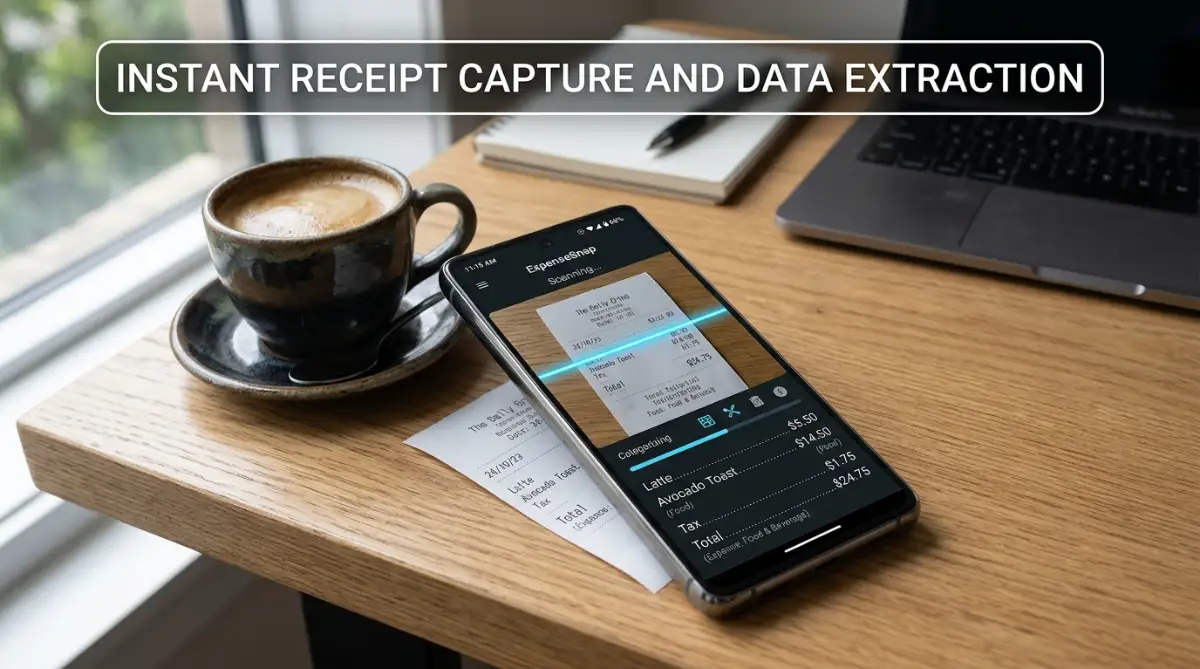
Saving shoeboxes of paper receipts is officially a relic of the past. Today, you can take out your phone and snap a quick photo of a receipt the second the cashier hands it to you.
Modern tools use smart optical character recognition to read the text on that wrinkled slip of paper. The software reads the merchant name, matches the currency, logs the sales tax, and reads the total amount.
The system then looks at your past habits to guess the right spending category. If you scan a receipt from a gas station, it assigns the charge to vehicle fuel without needing your input.
This means your business expenses are fully documented before you even walk out the door of the store. You can safely throw the paper receipt away because the digital copy attaches directly to the transaction record forever.

Tax time stops being a nightmare because every single deduction has an audit-ready image linked right next to it. You no longer lose out on tax write-offs just because a tiny receipt slipped under your car seat.
Watch: Setting Up Automated Bookkeeping in Under Ten Minutes
Check out this helpful walkthrough to see how fast you can connect your bank accounts and set up zero-stress bookkeeping rules:
3. Automated Bank Feeds and Frictionless Reconciliation
Bank reconciliation used to mean printing out thirty pages of statements and crossing off lines with a yellow highlighter. If the statement ending balance did not match your spreadsheet, you had to hunt through every line to find the mismatch.
Today, accounting platforms establish a secure, continuous link with your commercial bank and credit card providers. Every night, cleared transactions flow directly into your software dashboard waiting for your review.
The system runs matching rules against your existing invoices and logged receipts in real-time. When a client pays their bill, the software pairs the incoming bank deposit to the open invoice with high accuracy.
All you see is a green match button on your screen. You click it once, and both records clear off your to-do list instantly.
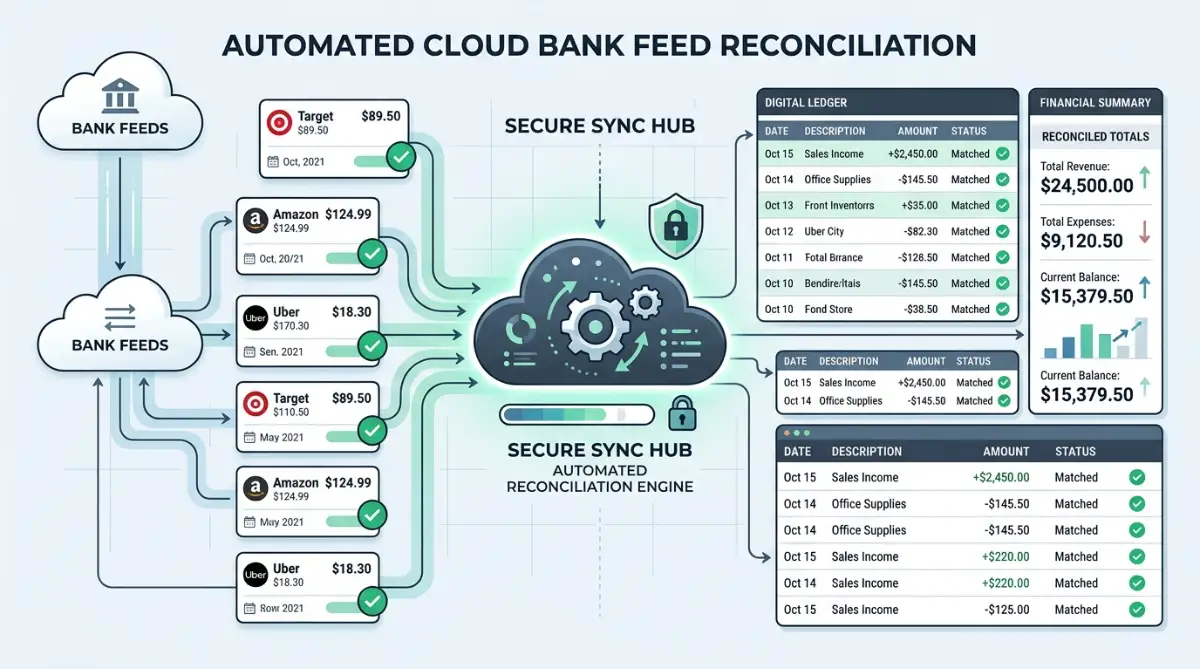
The same magic applies to regular monthly expenses like web hosting, rent, and utility bills. You can create simple rules that tell the system: "Whenever you see a charge from this vendor, categorize it under office software and clear it."
Over time, the software learns your business routines. The work of reconciling an entire month of busy transactions shrinks down to a five-minute coffee break task.
I used to think that setting up automated rules inside accounting software would take days of technical setup. I kept putting it off because I thought my business was too small for fancy systems. Once I finally spent twenty minutes teaching my software how to handle my three biggest suppliers, half of my weekly bookkeeping disappeared instantly.
Manual Record Keeping vs Modern Cloud Systems
To understand why this transition saves so much stress, compare how traditional tasks stack up against automated workflows:
Common Myths About Automated Bookkeeping
Many small operators hesitate to adopt modern platforms because of common misunderstandings. Let us bust a few myths that keep people stuck in spreadsheet quicksand.
Myth 1: "Software Automation Is Only for Big Corporations"
Some people think automated tools are expensive and built only for companies with huge accounting departments. The reality is that modern platforms are specifically made for solo business owners and small teams.
They are cheap, easy to set up on any computer, and require no special accounting degree to use. In fact, small businesses gain the most because they do not have extra staff to handle manual paperwork.
Myth 2: "Automation Takes Away My Control Over My Money"
A common fear is that software will make wild mistakes or pay bills without your permission. That is not how these tools work.
The software acts as your organizer, not your boss. It highlights matches and suggests categories, but you always retain the final say to approve or edit any transaction before it locks.
Myth 3: "Setup Takes Too Much Time and Technical Skill"
Getting started does not require hiring an IT consultant. Most modern platforms guide you through a simple step-by-step connection wizard that takes less than half an hour.
You can connect your bank, upload your company logo, and send your first professional invoice on your very first day. The time you invest upfront returns to you tenfold during your very first month.
How to Build Your Automated Routine Starting Today
Transitioning to automated financial software does not have to happen overnight. You can roll out these improvements in small, manageable chunks that build confidence.
First, stop sending manual invoices created on word processors. Pick a reputable cloud platform, design a clean invoice template with your logo, and turn on digital card payments.
Second, connect your main business checking account and credit card to the platform feed. Let the data flow in for a few days without stressing about old historical records.
Third, download the mobile companion app onto your phone right away. Make it a personal rule to photograph any business receipt before you leave the store parking lot.
Fourth, start creating simple automation rules inside your bank feed. Start with easy recurring charges like your phone bill, internet service, and software subscriptions.
Within a few weeks, you will notice something incredible happen at the end of the month. Instead of dreading your books, you will open your computer and see your numbers already balanced.
You get your evenings back, your business records stay crystal clear, and tax season turns into a calm non-event. Streamlined bookkeeping lets you focus your brainpower where it truly belongs: building a great business.
Smarter Ways to Keep Your Digital Books Spotless Over Time
Setting up automated bank feeds is only your first step toward financial peace of mind. To keep your system running cleanly as your client list grows, you need a few advanced habits.
The best operators do not wait until tax season to inspect their system rules. They build small routines that keep their digital ledgers accurate, lean, and completely dependable.
Here are the tested strategies that help you get the most out of modern financial software without adding extra work to your plate.
Build Granular Rules for Split Transactions
Many business purchases do not belong in a single expense bucket. For example, a single receipt from a major office supply store might include printer paper, coffee for the breakroom, and a computer monitor.
If you dump that entire receipt into office supplies, your spending reports become distorted. Modern platforms allow you to create automated split-rules based on item descriptions or percentages.
You can instruct your system to divide recurring supplier bills automatically across different cost categories. This keeps your category tracking razor-sharp without forcing you to do manual math on every receipt.
Real-World Example: Setting Up an Automated Split Rule
When you place a mixed order on Amazon or at an office depot, one invoice often holds several different expense types. Instead of doing the math by hand, here is how an automated split rule sorts a single $350 charge:
- Line 1 ($180): Assigned to Office Equipment (External desk monitor)
- Line 2 ($120): Assigned to Operating Supplies (Printer paper and packing boxes)
- Line 3 ($50): Assigned to Breakroom Hospitality (Ground coffee and snacks)
Once you save this rule, your system tags and distributes each dollar into the correct tax basket the moment the bank charge lands.
Connect Your Front-End Sales Directly to Your Ledger
If you run an online shop or send digital estimates, keep those sales tools linked to your core ledger. When an order takes place on your storefront, the data should flow into your accounting system instantly.
You can achieve this seamless handoff by connecting isolated SaaS tools without waiting for developers. Doing this eliminates duplicate data entry between your shopping cart and your accounting platform.
When sales data moves automatically, your revenue numbers match your bank deposits down to the exact cent. You also get immediate visibility into which products generate the strongest gross margins.
Set Smart Thresholds for Human Approvals
Complete automation works best when paired with sensible safety limits. You should never let software send massive payments or reclassify large capital assets without your eyes on them.
Inside your platform settings, create rule exceptions for any charge or payout over a specific dollar amount. For instance, you can let the system auto-reconcile charges under two hundred dollars, while flagging larger bills for a quick manual review.
This simple safety net protects your cash reserves from surprise vendor price hikes or billing mistakes. You stay completely in control of your treasury while skipping the boring low-value sorting work.
Secure Your Sensitive Financial Data in the Cloud
Automating your finances means your sensitive banking information and customer data live on cloud servers. Because of this, picking tools with bank-grade security standards should be a top priority for your business.
Before you commit to a platform, verify how SaaS providers encrypt your business files both during transfer and while stored. Always turn on multi-factor authentication for every team member who has access to your bookkeeping account.
Following these precautions ensures you remain aligned with FTC standards on financial privacy and consumer protection. A secure ledger keeps your business safe from bad actors and protects your company reputation.
Schedule a Monthly Fifteen-Minute System Sweep
Even the smartest machine rules need an occasional quick tune-up. Set a recurring calendar reminder on the first Friday of every month to audit your automated sorting rules.
During this quick sweep, look for unclassified transactions or vendors that might have changed their billing descriptions. Adjust your filters so the software continues to recognize those payments without manual input.
Over time, this fifteen-minute checkup keeps your financial engine running smoothly. You will never face an overwhelming cleanup job because your system remains clean week after week.

Traps That Can Break Your Automated Financial System
Switching to automated tools is exciting, but jumping in without a clear plan can create new headaches. Small configuration mistakes early on can turn into major balance discrepancies down the road.
If you understand these common pitfalls ahead of time, you can protect your records and avoid painful cleanup projects.
Blurring the Line Between Personal and Business Spending
The quickest way to ruin an automated bookkeeping system is using your business card for personal groceries or streaming subscriptions. When you mix spending, your automated bank feeds pull those personal transactions straight into your company ledger.
Your software will try to categorize those charges, which creates messy books and distorted profit numbers. Even worse, mixing funds can jeopardize your limited liability protection in the eyes of legal authorities.
Always maintain dedicated accounts and cards strictly for business use. The Small Business Administration guide on managing finances strongly advises separating accounts from day one to maintain clean business records.
Blindly Approving Automated Matches Without Looking
Automated software is remarkably smart, but it cannot read your mind. A common error is clicking "Approve All" without quickly scanning the suggested vendor names and dollar figures.
If two separate vendors charge you the exact same amount in the same week, the software might link the wrong payment to an invoice. If you click approve without looking, that mistake hides inside your ledger until an accountant spots it later.
Take two seconds to scan the vendor name and date before clicking confirm. That brief glance saves you hours of untangling confusing reconciliation errors in the future.
Letting Duplicate Bank Feeds Run Wild
Sometimes, a business owner connects both a physical bank feed and a payment processor feed that already deposits into that same bank. When this happens, transactions can get recorded twice—once from the processor and once from the bank statement.
Your revenue suddenly looks double what it actually is, throwing your estimated taxes completely out of balance. If your recorded income seems surprisingly high, check your active bank connections for double-counting feeds.
Make sure your software recognizes transfers between your own accounts as simple fund movements rather than new income or fresh expenses. Proper transfer matching keeps your true earnings accurate.
Ignoring Digital Receipt Storage for Deductions
Many founders think that having a line item on a credit card statement is enough proof for business write-offs. That assumption can cause serious pain during a formal financial review.
Tax authorities demand documented evidence showing what was bought, not just where money was spent. The official IRS guidelines on business recordkeeping require receipts that clearly list the date, amount, and business purpose of purchases.
Use your mobile receipt scanner for every single purchase right at the cash register. Having clear images attached directly to each transaction protects your tax deductions and keeps your records audit-ready.
Allowing Unchecked Software Sprawl to Bloat Your Budget
As you discover new digital solutions, it becomes tempting to add a separate subscription for every tiny administrative job. Before long, you are paying for three different tools that perform the exact same invoicing features.
To keep your business spending under control, conduct regular software stack audits for growing teams. Retain only the platforms that directly save you time or bring in revenue.
Trimming unused apps lowers your monthly overhead and keeps your financial feeds clean. A simpler software setup is always easier to manage and far less likely to break.
Quick Platform Fit: Which Tool Suits Your Revenue Level?
- Solo Freelancer ($0 to $50,000/year): Wave or FreshBooks Starter. Best for sending fast branded invoices and tracking basic income without paying for complex accounting modules.
- Growing Service Agency ($50,000 to $250,000/year): Xero Early or Growing tier. Great bank matching tools, easy digital receipt attachments, and simple accountant collaboration.
- Product or Multi-Channel Retailer ($250,000+/year): QuickBooks Online Plus. Ideal for deep inventory tracking, automatic vendor splits, and multi-currency transactions.
Your Simple Blueprint for a Zero-Stress Financial Routine
Reclaiming your evenings from bookkeeping does not require complicated accounting degrees. It simply requires pairing the right modern tools with consistent, small habits.
When you let software handle the repetitive tasks of invoicing and receipt scanning, bookkeeping stops feeling like a punishment. It becomes an invisible background system that gives you instant clarity on your business numbers.
Here is a straightforward action plan you can adopt starting this week to keep your books balanced without breaking a sweat:
- Every Morning: Spend two minutes checking your phone to approve any new bank matches while sipping your morning coffee.
- At Point of Sale: Snap a photo of physical receipts immediately with your mobile scanner before tucking your card away.
- Every Friday: Send your automated invoices for completed projects and review any flagged late payments.
- Monthly Closing: Spend fifteen minutes reviewing your profit and loss statement to spot spending trends and adjust your budgets.
By following this lightweight routine, you eliminate financial chaos before it ever starts. You can focus your energy on landing new clients, improving your products, and building a sustainable business.
I spent years believing that staying up late with spreadsheets made me a hard-working founder. Once I handed that busywork over to modern software tools, my business grew faster and my stress disappeared. Take that first step today, connect your accounts, and let technology give you your life back.
Got Questions About Automated Bookkeeping? Real Answers Here
Can modern accounting software replace my professional accountant?
Software handles daily data entry, invoice delivery, and basic reconciliation, but it does not replace expert tax advice. Instead, it gives your accountant clean, accurate records so they can focus on saving you money on taxes rather than cleaning up messy receipts.
How safe is it to link my business bank account to cloud accounting software?
Modern cloud accounting platforms use bank-level encryption protocols and read-only connections to monitor your accounts. The software cannot withdraw money or move funds on its own; it simply downloads your transaction history to match your records securely.
What should I do if a client refuses to pay through digital invoice links?
You can still accept paper checks or direct wire transfers whenever a client insists. Once the payment clears your bank account, your software will match that deposit to the open invoice with a single click.
Does optical receipt scanning work on crumpled or faded receipts?
Yes, modern character recognition can read text from wrinkled, angled, or lightly faded slips of paper with surprising accuracy. However, snapping a quick photo immediately after purchase ensures you get the highest quality scan before ink fades.
How much time does it actually take to set up an automated system?
Most solo business owners and small teams can link their accounts, set up an invoice template, and establish core rules in under forty minutes. Once finished, that initial setup saves you dozens of hours of repetitive admin work every single month.
Important Information Disclaimer
The information provided in this article is for educational and informational purposes only and does not constitute formal financial, accounting, legal, or tax advice. Every business situation is unique, and tax laws vary significantly by region and business structure. You should always consult with a licensed Certified Public Accountant (CPA), qualified tax professional, or legal advisor before making financial decisions or modifying your accounting procedures.